

Comparing PEO companies is harder than it looks. Pricing structures vary widely, service bundles differ, and vendors rarely make apples-to-apples comparisons easy. A company with 50 employees in a high-risk industry faces a completely different decision than a 200-person professional services firm, yet most comparison resources treat them the same way.
This guide covers eight approaches and tools that actually help you cut through the noise, from structured comparison platforms to evaluation frameworks you can build internally. Each method has trade-offs, and the right choice depends on how much time you have, how complex your situation is, and whether you want outside guidance or prefer to run the process yourself.
If you are new to PEOs and want foundational context before diving into comparison tools, [LINK CHECK: what-to-know-before-selecting-a-peo] is a useful starting point.
1. PEO Metrics
Best for: HR leaders who want structured, data-driven comparisons across multiple PEO providers
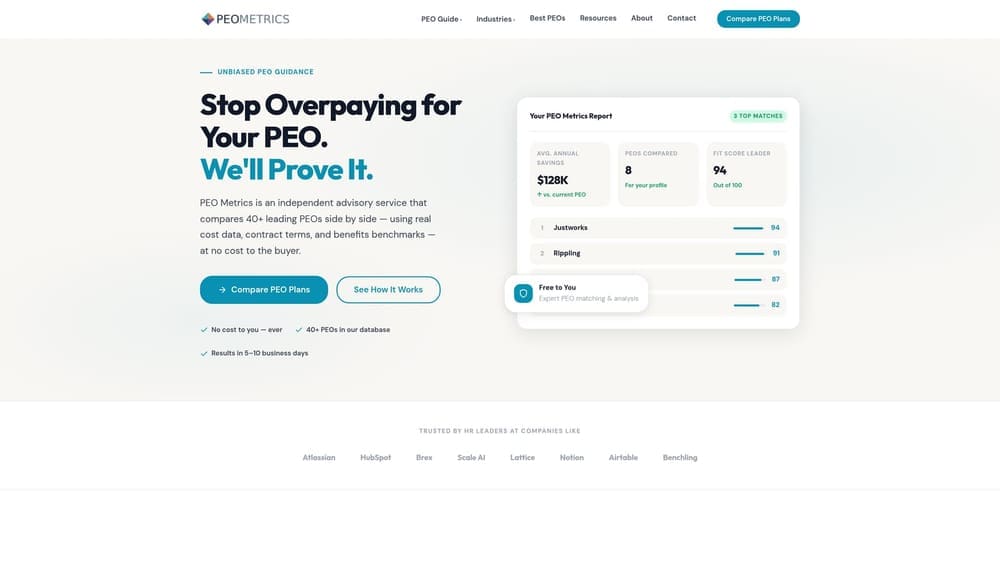
PEO Metrics is a structured comparison service built specifically for businesses evaluating PEO providers side by side.
Where This Tool Shines
Most comparison resources either give you a generic ranked list or leave you to gather data yourself. PEO Metrics is built around the actual complexity of the buying decision: pricing structures, service scope, and contract terms that differ enough across providers to make informal comparisons unreliable.
The platform is designed for HR leaders who need to present a defensible recommendation internally, not just a gut-feel shortlist. The focus on detailed metrics means you are comparing providers on the same dimensions rather than trying to reconcile apples-to-oranges proposals from each vendor’s sales team.
Key Features
Side-by-Side Provider Comparisons: Evaluate multiple PEOs against each other using consistent data points across pricing, services, and contract terms.
Pricing Analysis: Helps surface cost differences across providers that are often buried in proposal language or bundled fee structures.
Data-Driven Evaluation Framework: Built for HR leaders who need structured criteria rather than relying on vendor-supplied information alone.
Consultative Guidance: Oriented toward finding the right fit for your organization’s specific situation rather than producing a generic ranking.
Best For
Companies that are actively comparing three or more PEO providers and want a structured process with existing data infrastructure. Particularly useful for HR teams under time pressure who cannot afford to build a comparison framework from scratch, and for organizations where cost transparency is a priority.
Pricing
Contact PEO Metrics directly for details. Note that PEO Metrics may receive vendor placement fees, which is worth factoring into how you interpret any provider recommendations.
2. NAPEO Member Directory
Best for: Building an initial shortlist of vetted PEO providers to research further
NAPEO’s member directory is the official searchable database maintained by the National Association of Professional Employer Organizations.
Where This Tool Shines
When you are starting from zero and need to know which PEOs are worth considering, the NAPEO directory gives you a baseline. Because it only includes member organizations, you are at least working from a list of providers that have agreed to NAPEO’s code of conduct and membership standards.
It is most useful as a starting point rather than a decision tool. You can search by geography or company size to narrow the field before you begin requesting proposals or engaging a comparison platform.
Key Features
Searchable Member Directory: Filter by location and other criteria to identify relevant providers in your market.
Association Membership Signal: NAPEO membership indicates a provider has met the association’s basic standards, which is a useful initial filter.
Free Access: No cost to search or use the directory.
Shortlist Starting Point: Works well as the first step before moving to a more detailed comparison process.
Best For
Buyers in the early research phase who need to identify which PEOs operate in their region or serve their industry segment. Less useful once you have a shortlist and need to evaluate providers in depth.
Pricing
Free to use. NAPEO is a trade association funded by member dues and industry activities.
3. IRS CPEO Registry
Best for: Verifying whether a PEO holds Certified PEO status before signing a contract
The IRS CPEO Registry is the authoritative, government-maintained list of PEOs that have achieved Certified PEO status under federal standards.
Where This Tool Shines
CPEO certification is not a marketing designation. It means a provider has met specific financial, background, and reporting standards set by the IRS under the Tax Increase Prevention Act of 2014. Critically, CPEO status determines who holds federal employment tax liability in the co-employment arrangement, which has meaningful legal and financial implications for your business.
If tax liability transfer is a priority for your organization, this registry should be a mandatory cross-reference step, not an optional one. A PEO can be NAPEO-member, highly reviewed, and well-regarded without holding CPEO status.
Key Features
Government-Maintained Accuracy: The IRS updates this list directly, making it the only authoritative source for CPEO status verification.
Tax Liability Clarity: CPEO certification affects who bears federal employment tax liability, a distinction that matters for risk management and compliance.
Free Public Access: Available to any buyer at no cost.
Cross-Reference Tool: Best used alongside other comparison methods rather than as a standalone evaluation resource.
Best For
Any organization for whom federal employment tax liability transfer is a meaningful consideration. This is especially relevant for companies in industries with complex tax situations or for finance teams that want to understand the legal structure of the co-employment arrangement before committing.
Pricing
Free. This is a public government resource.
4. G2
Best for: Reading verified user reviews and comparing PEOs by company size or industry segment
G2 is a software and services review platform with a dedicated PEO category featuring a substantial volume of verified user reviews.
Where This Tool Shines
G2 is genuinely useful for understanding what current and former customers think about a PEO’s support quality, implementation experience, and day-to-day usability. The ability to filter reviews by company size means a 40-person company can focus on feedback from similar organizations rather than reading reviews from enterprise clients with entirely different needs.
The important caveat: G2 receives fees from vendors for enhanced listings and placement. Rankings and visibility on the platform are influenced by vendor spend, so treat G2 as a qualitative research input rather than an objective ranking of providers.
Key Features
Verified User Reviews: Reviews are filtered for authenticity, which improves signal quality compared to unmoderated platforms.
Category Filtering: Filter reviews by company size, industry, and use case to find feedback relevant to your situation.
Multi-Dimension Ratings: Star ratings across categories like ease of use, customer support, and implementation quality.
Comparison Grids: Feature-level side-by-side views across competing providers.
Best For
Buyers who want qualitative insight into the actual user experience with a PEO, particularly around support responsiveness and implementation. Less reliable for pricing comparisons or objective rankings given the vendor-paid placement model.
Pricing
Free for buyers. Vendors pay for enhanced listings and improved placement visibility.
5. Capterra
Best for: Feature-level comparisons and initial pricing range research across PEO providers
Capterra is a software discovery platform with PEO listings, feature comparison grids, and user reviews.

Where This Tool Shines
Capterra’s comparison grids make it easy to see which providers offer specific features side by side. For buyers who are still defining what they need from a PEO, the feature matrix format can help clarify which capabilities are standard across providers and which are differentiators.
Like G2, Capterra’s sort order and placement are affected by vendor advertising spend. The platform is a useful research input, particularly in early-stage evaluation, but should not be treated as an unbiased ranking. Use it to generate questions for vendor conversations rather than to make final decisions.
Key Features
Side-by-Side Feature Grids: Compare specific capabilities across multiple PEO providers in a structured format.
Pricing Range Indicators: Where vendors have disclosed pricing ranges, Capterra surfaces them for initial benchmarking.
Filtering Options: Narrow by company size, deployment type, and specific feature requirements.
User Reviews: Supplemental qualitative data on user experience, though volume varies by provider.
Best For
Buyers in the early discovery phase who want to understand the feature landscape before narrowing their shortlist. Also useful for identifying pricing ranges where vendors have voluntarily disclosed them, which is not universal in the PEO market.
Pricing
Free for buyers. Vendors pay for placement and enhanced listings, which affects sort order.
6. A Structured RFP Process
Best for: Organizations that need a documented, defensible evaluation process with written vendor commitments
A formal Request for Proposal process requires each PEO to respond to identical questions, creating a structured basis for comparison that no platform can fully replicate.
Where This Tool Shines
The core advantage of an RFP is that it forces vendors to answer the same questions in writing. When you are evaluating three or four PEOs based on their sales presentations alone, you are comparing polished pitches, not comparable data. An RFP changes that dynamic by requiring each provider to commit to specifics: pricing structure, workers’ comp handling, benefits options, exit terms, and compliance support scope.
It also creates a paper trail. If a vendor promises something during the sales process that does not appear in the contract, you have documentation to reference. For organizations with complex needs or significant headcount, that record has real value.
Key Features
Standardized Vendor Responses: Every provider answers the same questions, making comparison genuinely apples-to-apples.
Written Commitments: Vendor responses document what they are promising before contract negotiation begins.
Customizable Criteria: Weight questions toward what matters most for your industry, risk profile, or compliance situation.
Defensible Decision Record: Useful for internal stakeholders who need to understand how the final provider was selected.
Best For
Mid-size to larger organizations, companies switching providers after a difficult experience, and any buyer for whom the selection decision requires internal approval or documentation. The time investment is significant, so this approach is best suited to situations where the stakes justify the process.
Pricing
No direct cost. The investment is internal time to draft the RFP, manage vendor responses, and score results consistently.
7. A PEO Broker or Consultant
Best for: Time-constrained buyers who want experienced guidance and a narrowed shortlist quickly
A PEO broker or consultant is an independent advisor who manages the selection process on your behalf, typically drawing on existing vendor relationships and market knowledge.
Where This Tool Shines
An experienced broker knows the PEO market in a way that most HR leaders simply do not have time to develop. They can often narrow a shortlist faster than self-directed research and bring negotiating context that is difficult to replicate without prior deal experience. For a company that needs to make a decision quickly and does not have the bandwidth to run a structured process internally, a broker can meaningfully compress the timeline.
The trade-off worth understanding clearly: most PEO brokers are compensated by the PEO that is ultimately selected, not by you. Ask about compensation structure upfront. A broker who is paid more by certain providers has an incentive that may not perfectly align with your priorities. That does not make brokers unreliable, but it is a factor to weigh.
Key Features
Market Knowledge: Brokers often have current pricing intelligence and provider-specific experience that is hard to gather independently.
Shortlist Efficiency: Can identify relevant providers faster than starting from a directory or review platform.
Negotiating Context: Familiarity with typical contract terms and pricing norms can support better outcomes in negotiation.
Guided Process: Useful for buyers who prefer a managed experience over self-directed research.
Best For
Companies with limited internal HR bandwidth, first-time PEO buyers who want experienced guidance, and organizations under time pressure. Ask any broker directly how they are compensated and by whom before engaging their services.
Pricing
Typically no direct cost to the buyer. Broker compensation usually comes from the selected PEO provider, which is worth factoring into how you evaluate recommendations.
8. An Internal Scoring Scorecard
Best for: Teams that want full control over the evaluation criteria and no third-party influence on the process
An internal scoring scorecard is a self-built evaluation framework where your team defines weighted criteria and scores each PEO candidate consistently against them.
Where This Tool Shines
Every organization has priorities that no generic comparison tool fully captures. A company in a high-risk industry may weight workers’ comp handling more heavily than anything else. A multi-state employer may prioritize compliance support above cost. A company with high turnover may care most about benefits flexibility and onboarding experience. A scorecard lets you encode those priorities directly into the evaluation process.
Weighted scoring also prevents a single impressive sales presentation from distorting the overall assessment. When each provider is scored against the same criteria with the same weights, the decision reflects your actual priorities rather than whoever gave the best demo.
Key Features
Fully Customizable Criteria: Define the evaluation dimensions that reflect your organization’s specific situation, not a generic template.
Weighted Scoring: Assign higher weights to criteria that matter most, so the final scores reflect real priorities.
No Third-Party Influence: The process is entirely internal, with no vendor advertising or placement fees affecting the outcome.
Works Best in Combination: Most effective when paired with a structured data-gathering method like an RFP or comparison platform to ensure consistent inputs.
Best For
Organizations with clear internal priorities, teams that want to document their decision-making process, and any buyer who wants to reduce the influence of vendor sales dynamics on the final outcome. Requires upfront time to build but produces a reusable framework for future evaluations.
Pricing
No direct cost. The investment is internal time to design the scorecard, gather consistent data from each provider, and score results.
Which Approach Is Right for Your Situation
No single comparison method works for every buyer. A 30-person company shopping its first PEO has different needs than a 300-person firm switching providers after a difficult experience. The most reliable outcomes tend to come from combining two or three approaches rather than relying on any one.
A practical starting point for most buyers: use a structured platform or internal scorecard to define your evaluation criteria, cross-reference qualitative feedback from G2 or Capterra, and confirm CPEO status through the IRS registry if federal employment tax liability transfer matters to your organization. If you want a process that already has the data structure built in, PEO Metrics provides side-by-side provider analysis with detailed pricing and service metrics so you are not starting from scratch.
For additional context on what typically goes wrong in PEO relationships, [LINK CHECK: why-peos-fail-companies] covers the patterns worth knowing before you commit. And if you are still deciding whether a PEO is the right structure at all versus an ASO or internal HR function, [LINK CHECK: what-is-an-aso] explains the distinction clearly.
Before you sign that PEO renewal, make sure you are not leaving money on the table. Many businesses unknowingly overpay because of bundled fees, hidden administrative markups, and contracts designed to limit flexibility. PEO Metrics gives you a clear, side-by-side breakdown of pricing, services, and contract terms so you can see exactly what you are paying for and choose the option that fits your business. Don’t auto-renew. Make an informed, confident decision.
