
A finance team approves a PEO because the pricing works, the benefits package looks competitive, and the sales demo checks the usual boxes. Then the implementation goes live. Within weeks, managers can't approve time off without opening support tickets, employees struggle to pull pay stubs for a mortgage application, and HR spends its mornings explaining basic portal steps instead of handling actual people issues.
That scenario happens because many buyers treat the portal like a side feature. It isn't. The PEO employee portal is the operating surface of the relationship. It's where employees experience payroll, benefits, onboarding, tax documents, and policy access. It's also where HR and finance find out whether the PEO's back office is connected, secure, and usable.
For companies with 10 to 2,000 employees, this matters more than most RFPs admit. A weak portal doesn't just annoy employees. It creates payroll workarounds, delays approvals, limits reporting, and makes a future switch harder and more expensive than expected. A strong portal reduces friction every pay period. A bad one keeps billing the business in labor time, support escalations, and avoidable frustration.
Table of Contents
- Introduction The Portal Is Not a Feature It Is the Relationship
- What a PEO Portal Is and Is Not
- Key Features for Employees and Why They Matter
- Essential Features for Admins and Leadership
- Security Integration and Data Integrity
- A Practical Checklist for Evaluating PEO Portals
- Negotiating Your Portal and Avoiding Exit Traps
Introduction The Portal Is Not a Feature It Is the Relationship
A PEO portal isn't a convenience layer. It's the place where the co-employment model becomes real for the workforce. Employees don't experience the legal structure, underwriting, or compliance engine directly. They experience the login screen, the pay stub, the benefits election flow, the PTO request, and the support path when something goes wrong.
That distinction matters because the portal often determines whether the PEO feels organized or chaotic. If an employee can't update direct deposit cleanly, or a manager can't approve a leave request without calling support, confidence in the whole arrangement drops fast. The promised value of outsourced HR starts to look theoretical.
There also isn't one standard market portal everyone uses. Each PEO runs its own environment. According to Lone Star PEO's review of the industry's footprint, there is no single unified PEO employee portal. Instead, each of the estimated 780 to 980 PEOs in the United States maintains its own proprietary portal, collectively serving 2.7 million to 3.4 million worksite employees across separate digital interfaces.
Practical rule: If the portal is clunky, employees won't blame the PEO. They'll blame their employer for choosing it.
For a CFO, that creates a simple due diligence issue. A cheaper PEO can become the more expensive option if HR has to manually bridge portal gaps every week. The hard cost may show up in extra payroll review time, support escalations, delayed onboarding, or turnover friction. The soft cost shows up in credibility. Employees expect consumer-grade access to basic employment data. If the portal can't deliver that, the PEO relationship starts underwater.
What a PEO Portal Is and Is Not
The portal is the front door to co-employment
The easiest way to think about a PEO portal is this. It's the digital nervous system of the relationship. The PEO handles payroll, tax administration, benefits administration, and employment support in the background. The portal is how employees, managers, HR, and finance interact with that machinery.
That makes it very different from a traditional HRIS. In a standard HRIS setup, the employer usually owns the software configuration, controls the workflows, and determines how data moves through the system. In a PEO model, the employer is using a controlled window into infrastructure the PEO manages. That can be efficient, but it also means the buyer has less freedom than many teams assume.
A lot of confusion starts there. Buyers ask whether the portal has payroll, benefits, and document storage. That's too shallow. The real question is who controls the rules, exports, permissions, reporting logic, and support path when the business needs something outside the standard flow. For teams comparing delivery models, this is one of the core differences between a PEO and an outsourced HR-only arrangement, which is why a side-by-side explainer like this guide to PEO vs HRO models is useful before the demos start.
What control looks like in practice
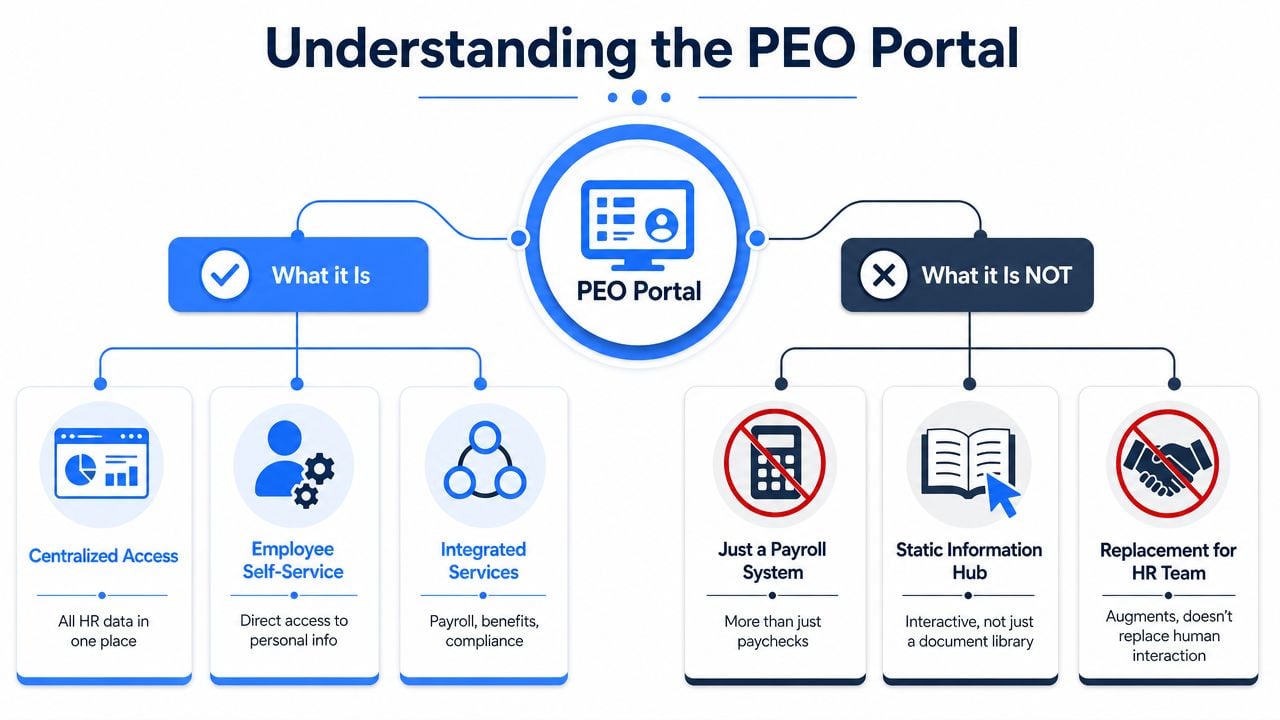
A portal is not just a payroll login. It isn't just a document library either. And it definitely isn't a substitute for an HR team.
What a good portal usually does well:
- Centralized access: Employees can reach payroll, tax forms, benefits details, and HR records from one place.
- Self-service: Workers can handle common updates themselves instead of emailing HR.
- Integrated processes: Onboarding, payroll changes, and benefits tasks connect instead of living in separate silos.
What a weak portal often reveals:
| Portal claim | What it can mean in practice |
|---|---|
| "All-in-one access" | Several stitched-together tools behind one login |
| "Employee self-service" | Employees can see data, but can't complete key changes cleanly |
| "Reporting" | A fixed menu of canned reports with little export flexibility |
For buyers that want a broader grounding in how HR automation changes administrative work, SheetMergy's overview of HR technology is a useful primer. It helps frame why workflow design matters just as much as feature count.
The key operating reality is simple. Every PEO portal is a proprietary system with its own logic. That means every buyer should assume there will be limits, then test whether those limits matter to the business.
Key Features for Employees and Why They Matter

Payroll access is the first trust test
For most employees, the first serious interaction with a PEO employee portal isn't benefits enrollment. It's payroll. Can they see the pay stub they expected, when they expected it, without needing help?
That sounds basic, but it's where confidence gets built or lost. Employers Resource states that its EZ Pay system gives employees access to payroll information 24 hours a day, 7 days a week, including pay stubs and W-2s, in its explanation of employee payroll access through the portal. That's the standard employees now expect. If a worker needs a pay stub on Friday night for an apartment application, waiting until Monday isn't a minor inconvenience.
A practical employee test should include moments like these:
- A new hire needs tax forms: Can the employee complete onboarding documents from a phone, or does the process break on mobile?
- A long-term employee changes banks: Can direct deposit be updated inside the portal without routing the request through HR?
- A manager needs year-end records: Can prior tax documents be found without digging through support articles?
A portal earns trust when employees can solve routine problems on their own in a few clicks.
Benefits and HR self-service shape daily sentiment
Benefits access matters most when employees are stressed, sick, or making a time-sensitive decision. That's exactly when a bad interface does the most damage. Workers should be able to review plan details, find forms, and complete enrollment actions without translating insurance jargon or hunting across multiple logins.
Some PEOs do a decent job of giving employees access to payroll and broader HR information in one environment. PrestigePEO, for example, describes portal access to payroll and HR information alongside employee online services and a forms library on its main platform overview. OneSource PEO also presents client and employee online services together with forms access in its HR and payroll access page. Those details matter because they suggest whether the portal was designed as a working system rather than a single-purpose pay screen.
HR self-service should also cover policies, handbook access, and common forms. If a company is rebuilding or updating those materials during implementation, a structured resource like Dokly's employee handbook template can help standardize what employees see in the portal.
A useful way to evaluate employee features is to stop asking whether the portal includes them and start asking whether employees will use them. If the answer depends on training sessions, workaround guides, or repeated HR intervention, the feature exists on paper but not in operations.
Essential Features for Admins and Leadership
Employee-facing functions get the attention, but admin capability is where the buyer finds out if the portal will lower workload or just relocate it. HR needs clean workflows. Finance needs visibility and control. Leadership needs confidence that the data is usable before it reaches payroll, benefits, or compliance filings.
What HR needs to control
A strong admin view should make it easy to move an employee through the full employment lifecycle. That includes onboarding, status changes, leave events, terminations, document acknowledgments, and compliance follow-up. If any of those steps break into email chains and spreadsheets, the portal isn't doing its job.
One area to test hard is compliance workflow. Effective portals offer ACA compliance support and automated digital workflows for unemployment claims, which can reduce manual administrative tasks by 50% to 60%. They can also flag employees nearing ACA hour thresholds and generate required notices, helping employers avoid IRS penalties tied to missed administration.
For HR directors, the questions aren't abstract:
- Onboarding control: Can HR assign location-specific forms and track completion without chasing people?
- Termination workflow: Does the system trigger the right downstream tasks, including final payroll handling and benefits notices?
- Compliance reporting: Can HR access standard compliance reports without opening a service request every time?
What finance and leadership need to see
Finance teams need a portal that supports review, not just recordkeeping. Payroll preview, approval routing, labor-cost reporting, tax visibility, and exportable reports matter more than a polished dashboard. A CFO shouldn't have to accept summary views when the business needs department-level detail or a clean file for reconciliation.
This is also where role-based access matters. Managers should see only what they need. HR should have broader access. Finance should be able to review payroll and cost data without giving everyone blanket visibility.
A simple decision table helps separate operational value from demo polish:
| Role | What must work well | What usually goes wrong in weak portals |
|---|---|---|
| HR director | Onboarding, status changes, compliance tasks | Too many manual handoffs |
| CFO | Payroll approval, reporting, cost visibility | Reports aren't export-ready or timely |
| Owner or COO | Snapshot visibility, exception handling | Data is available but not decision-ready |
A portal that supports those admin and leadership needs can become a real management tool. A portal that doesn't will push the business back toward email, spreadsheets, and side-car systems. Buyers comparing platform depth should review how different providers position their technology stack and service model, which is why this analysis of PEO HR technology platforms is worth reading alongside product demos.
Security Integration and Data Integrity
A polished interface can still hide a weak stack
A clean dashboard doesn't tell a buyer much about system quality. Plenty of portals look modern on the surface and still rely on brittle back-end processes, delayed syncing, or manual imports between modules. That's where payroll mistakes, reporting gaps, and data mismatches usually start.
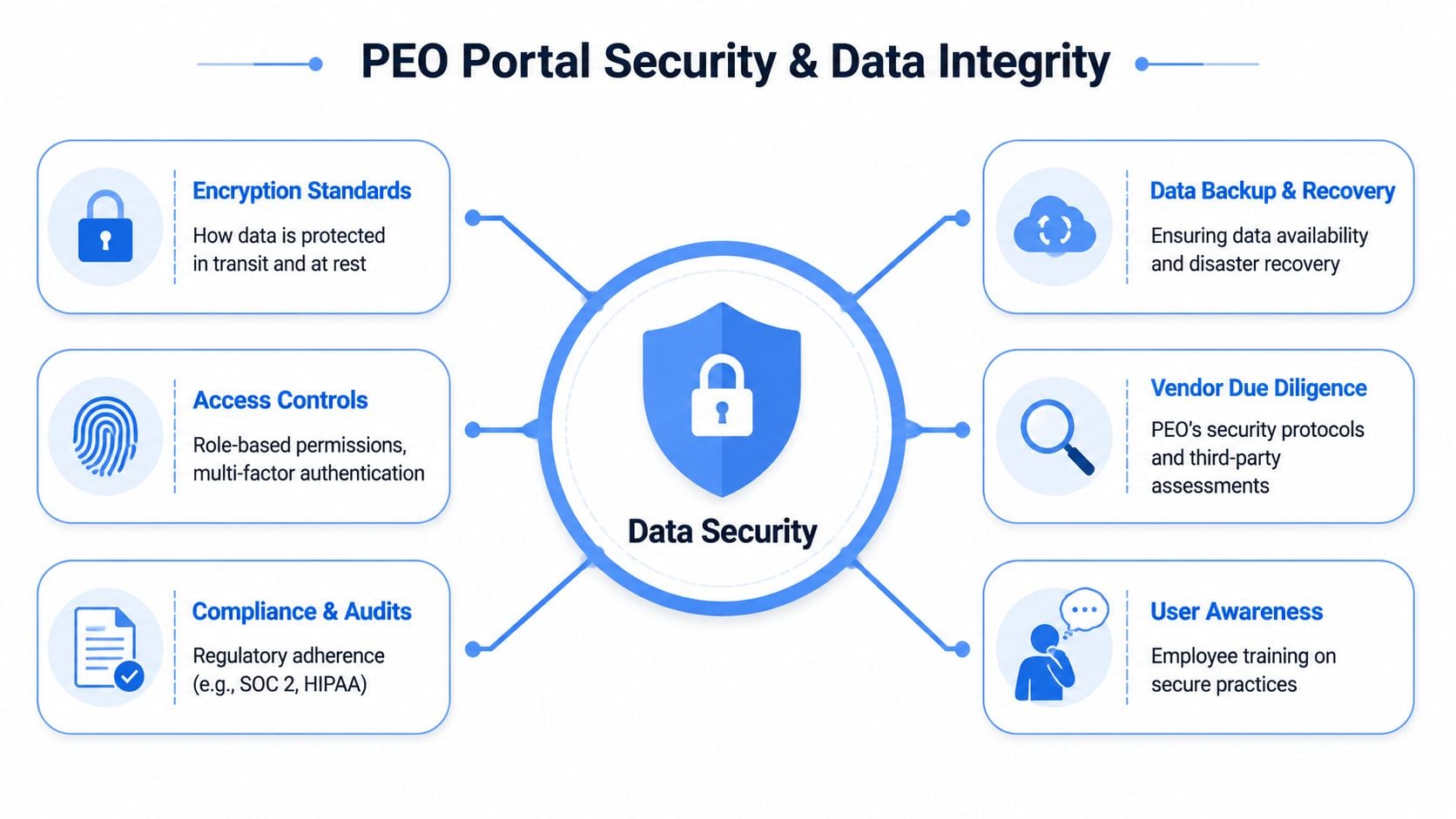
The biggest technical issue to verify is whether the portal runs on real-time, bidirectional data synchronization. Portals built on a single unified platform can reduce payroll processing time by 30% to 40% because status changes flow directly into the payroll engine without manual transfer. If a new hire, termination, or address change doesn't update everywhere automatically, the business ends up paying for those breaks in review time, correction cycles, and employee support.
Security belongs in the same conversation. Sensitive payroll, tax, and benefits data should never sit behind weak access controls. Buyers should confirm multi-factor authentication, role-based permissions, and standard security controls such as encryption. For teams that want a practical non-HR resource on how cloud systems should protect sensitive records, this cloud security guide for startups from AuditYour.App is a useful reference point.
Watch for this phrase: "We can import that." In many PEO demos, that means someone will fix the mismatch later.
Questions that expose fragile architecture
Technical diligence doesn't require an engineering team. It requires better questions and a refusal to accept vague answers.
Ask for specifics on these points:
- Data movement: Is the connection to payroll, benefits, and HR records live, or does data move on a scheduled batch?
- Permissioning: Can access be limited by role, location, or entity without custom work?
- Auditability: Can the admin team see who changed key employee records and when?
- Mobile function: Is the mobile experience full-featured, or just enough to view a stub and log out?
A short comparison helps during evaluation:
| Architecture choice | Operational result |
|---|---|
| Unified platform with live sync | Fewer handoffs, fewer reconciliation issues |
| Separate tools tied together loosely | More exceptions, more support dependence |
| Strong role controls and MFA | Lower risk around sensitive employee data |
| Weak access setup | Higher exposure and harder internal governance |
Data integrity also becomes a contract issue when the relationship ends. A portal can feel efficient during implementation and still create serious problems during a switch if the buyer never negotiated export rights, file formats, or retrieval timing. That's why data ownership and handoff language deserves the same scrutiny as pricing and benefits terms. Buyers that need a framework for that review should study PEO data ownership clauses carefully before signing.
A Practical Checklist for Evaluating PEO Portals
Use show me commands instead of generic questions
Most portal demos fail because the buyer lets the seller control the route. The rep clicks through the cleanest screens, shows a dashboard, opens a benefits tab, and moves on. That tells the buyer almost nothing.
A better approach is to run the demo like an operating review. Use direct scenario-based prompts and insist on live clicks. If the rep says a feature exists but can't show it, treat that as unproven.
Use commands like these during the demo:
- Show the exact onboarding flow for a new remote employee, including tax forms, policy acknowledgments, and task tracking.
- Show how a manager approves time off from both desktop and mobile.
- Show how an employee changes direct deposit and what approvals, if any, are triggered.
- Show the process for an off-cycle payroll adjustment for a bonus or correction.
- Show where an employee finds prior tax forms without contacting support.
- Show the standard labor-cost reports available to finance and how they export.
- Show the termination workflow and identify what tasks are automated versus manual.
- Show how role-based access works for HR, finance, managers, and executives.
Buyers should never ask, "Can your portal do this?" They should ask, "Show how it works when something goes wrong."
Score the demo like an operator not a shopper
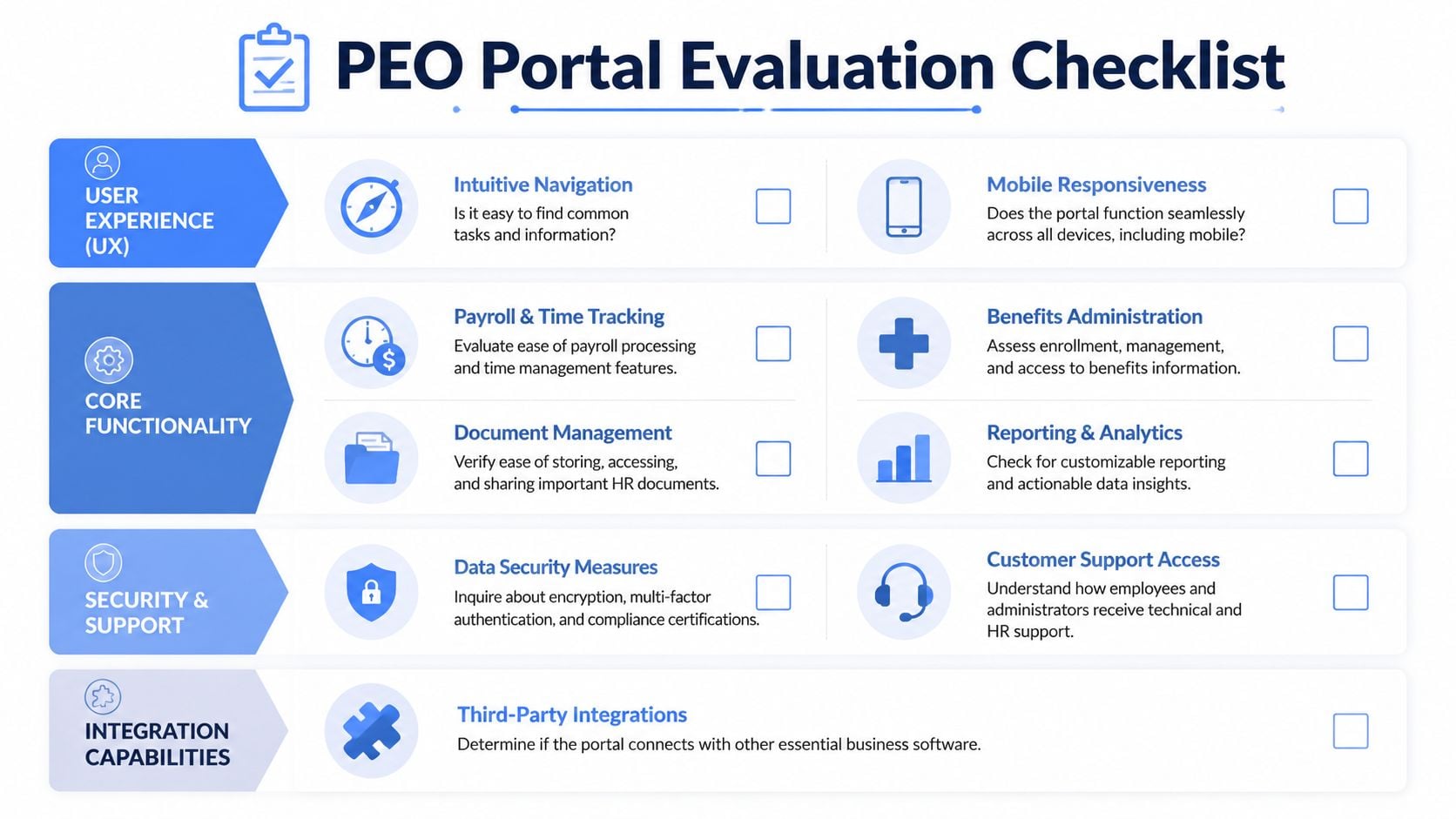
A clean demo can still hide operational pain. The right scoring method focuses on friction. How many clicks? How many handoffs? How many places can data go stale? How often does someone need vendor support for routine actions?
A practical scorecard can look like this:
| Evaluation area | What to watch for |
|---|---|
| Employee usability | Can employees complete common tasks without training-heavy instructions? |
| Admin efficiency | Do workflows stay inside the system, or spill into email and spreadsheets? |
| Reporting | Are reports usable for decisions, exports, and audits? |
| Security | Are MFA, permissions, and change logs clearly defined? |
| Support model | Who answers portal issues, and how fast? |
Add one more discipline. Ask the rep to stop the standard presentation and perform a task chosen by the buyer. That single move often reveals whether the portal was built for everyday operations or for demos.
Contract review should start before final selection, not after. If a provider limits reporting, charges for configuration changes, or gives vague answers on data access, those issues usually show up in the agreement. Buyers that want a structured way to review those terms before signing should use a framework like this PEO contract risk audit guide.
Negotiating Your Portal and Avoiding Exit Traps
The portal isn't just software. It's a contractual dependency. Once payroll history, employee records, benefits elections, and compliance documents sit inside a proprietary system, the switching cost becomes real whether or not it was obvious at sale.
Portal terms belong in the contract
Many buyers negotiate admin fees and renewal pricing but skip portal terms. That's a mistake. If the business needs custom reporting, extra roles, implementation support, or stronger service commitments, those points should be written down.
At minimum, buyers should press on these terms:
- Data export rights: What formats are available, and what is included in a full export?
- Support obligations: Who handles employee login issues, and what response commitments exist?
- Configuration limits: What changes count as standard service versus paid project work?
- Mobile functionality: Is the mobile app fully functional for employee self-service or only partial?
Negotiate the exit before signing the entry
The least discussed portal risk is data portability. A buyer may assume historical payroll and HR records can be exported easily at termination. That assumption is often wrong. A 2025 Gartner report found that 64% of SMBs switching PEOs faced significant delays of 7 to 14 days retrieving historical payroll and HR data because portals lacked standardized export formats. It also found that 41% of PEO contracts included data retrieval fees ranging from $500 to $5,000.
Those numbers matter because the cost isn't only the fee. A delayed data handoff can disrupt payroll parallel runs, benefit transitions, and audit readiness during the exact period when the company is already absorbing implementation work.
The safest approach is to negotiate the exit language upfront. A workable clause is straightforward: the PEO provides a full export of client data in a standard format such as CSV within a defined period after termination, at no additional cost. If a provider resists that, the buyer has learned something important before signing.
Companies evaluating, switching, or renegotiating a PEO can use PEO Metrics to compare providers, pressure-test portal trade-offs, and identify contract terms worth negotiating before they become expensive surprises.
