
A payroll run spans three states, benefits renewal costs are rising, and compliance notices arrive from unfamiliar agencies. The HR director needs accurate employee records. The CFO needs to know which party is responsible when a tax filing, deduction, or workers' compensation issue fails.
That scenario shows why what is PEO software requires more than a feature list. A professional employer organization shares defined employer responsibilities with the client company, while the client continues directing employees' daily work. The software connects those responsibilities across payroll, benefits, tax filings, compliance, workers' compensation, and employee records.
PEO software is therefore co-employment infrastructure, not another HR application. It gives the PEO and client a shared operating environment, while clarifying who enters information, submits filings, reviews exceptions, and retains records. That design affects liability transfer, security controls, and contract economics. The global market was valued at USD 6.29 billion in 2024 and projected to reach USD 12.0 billion by 2033, according to DataHorizzon Research's PEO software market estimate.
Table of Contents
- Introduction to What PEO Software Really Is
- How Co Employment Makes PEO Software Different
- Core Features That Power the PEO Platform
- PEO Software Versus HRIS HCM and Payroll Tools
- Common Pitfalls Security Gaps and Compliance Risks to Watch
- How to Evaluate and Choose the Right PEO Software Partner
- Key Takeaways for Making a Confident PEO Decision
Introduction to What PEO Software Really Is
A PEO relationship becomes practical only when both parties can work from the same employment records. The client company still directs employees' daily work, while the PEO carries or shares defined administrative responsibilities under the professional employer organization model. Those responsibilities can include payroll administration, benefits, employment-tax handling, compliance support, and workers' compensation administration.
PEO software provides the operating infrastructure for that arrangement. It connects employee data with payroll processing, benefits enrollment, compliance workflows, reporting, and related records. The platform also creates a working boundary between the PEO and client: who enters a change, who reviews it, who submits a filing, and who retains evidence.
Market estimates cited earlier reflect growing interest in this type of infrastructure. The figures vary by research method, but the broader pattern is clear: organizations are treating PEO technology as more than a payroll interface.
The mental model for buyers
A company with 10 to 2,000 employees should assess PEO software against the responsibilities it helps coordinate, not only the screens employees use. Ask:
- Which party owns each employment-tax process?
- Where is the authoritative employee record kept?
- How does a benefits election flow into payroll?
- Which compliance tasks run automatically, and which require human review?
- What happens to data, records, and tax responsibility when the agreement ends?
A payroll vendor may calculate and deliver wages while the client retains legal and filing responsibility. A PEO arrangement changes that division by sharing employer responsibilities through a co-employment agreement. The software must therefore support the agreement's practical rules, rather than merely process transactions.
That distinction changes how buyers should review a platform. Examine the audit trail for employee changes, access permissions for PEO and client users, controls around sensitive payroll and benefits data, and the workflow for correcting an error. Then connect those capabilities to the contract: a system may organize work clearly while the agreement determines which party bears responsibility, pays fees, or handles an obligation after termination.
The practical test is whether the platform makes shared employment administration visible and controllable. Evaluate PEO software as co-employment infrastructure, with attention to liability allocation, security, data control, compliance coverage, and contract economics. Interface quality matters, but it does not answer who remains responsible when a filing is late, a deduction is wrong, or records must be transferred.
How Co Employment Makes PEO Software Different
A company can approve a raise on Monday, move an employee to another state on Tuesday, and expect payroll to reflect both changes correctly. In a co-employment arrangement, the client still decides whom to hire, what work employees perform, and how managers direct performance. The PEO handles or shares defined employer-administration duties, including payroll, benefits, compliance workflows, and workers' compensation.
A general contractor analogy clarifies the boundary. The client directs the project and makes daily operating decisions. The PEO acts as a specialist contractor for assigned administrative and regulatory work. Both parties need accurate information and clear approval rights. If the client changes compensation or work location, the PEO needs that update before the related payroll, tax, or compliance action.
Why one record matters
Co-employment connects records that standalone tools often separate. A compensation change affects payroll. A new work location can alter tax handling. A benefits election changes deductions and reporting. A workers' compensation classification affects risk administration.
PEO software therefore needs a single source of truth for employee data, payroll, tax, benefits, and compliance records. Without it, teams may rely on spreadsheets, duplicate entries, email, or disconnected applications. Every handoff increases the chance that the client and PEO act on different information.
The operating sequence is straightforward:
- The client enters or approves an employee change.
- The platform updates the relevant employee record.
- Payroll, benefits, tax, and compliance workflows use that information.
- The PEO reviews exceptions, completes required actions, and maintains the appropriate records.
The software does not replace professional judgment. It puts the facts behind that judgment in one place.
For a clearer explanation of the legal and operational relationship, the PEO co-employment model provides useful context. Buyers can apply that model when testing vendor claims. A platform with payroll screens is not the same as infrastructure within a full co-employment arrangement if the client remains responsible for every filing.
Practical rule: As the PEO assumes more responsibilities, verify data ownership, approval rights, audit trails, liability allocation, and exit procedures.
The architectural distinction matters. An ordinary HR tool helps one company manage information. PEO software coordinates information between two organizations sharing defined employer responsibilities, while the agreement determines who bears liability, controls records, and pays obligations after termination.
Core Features That Power the PEO Platform
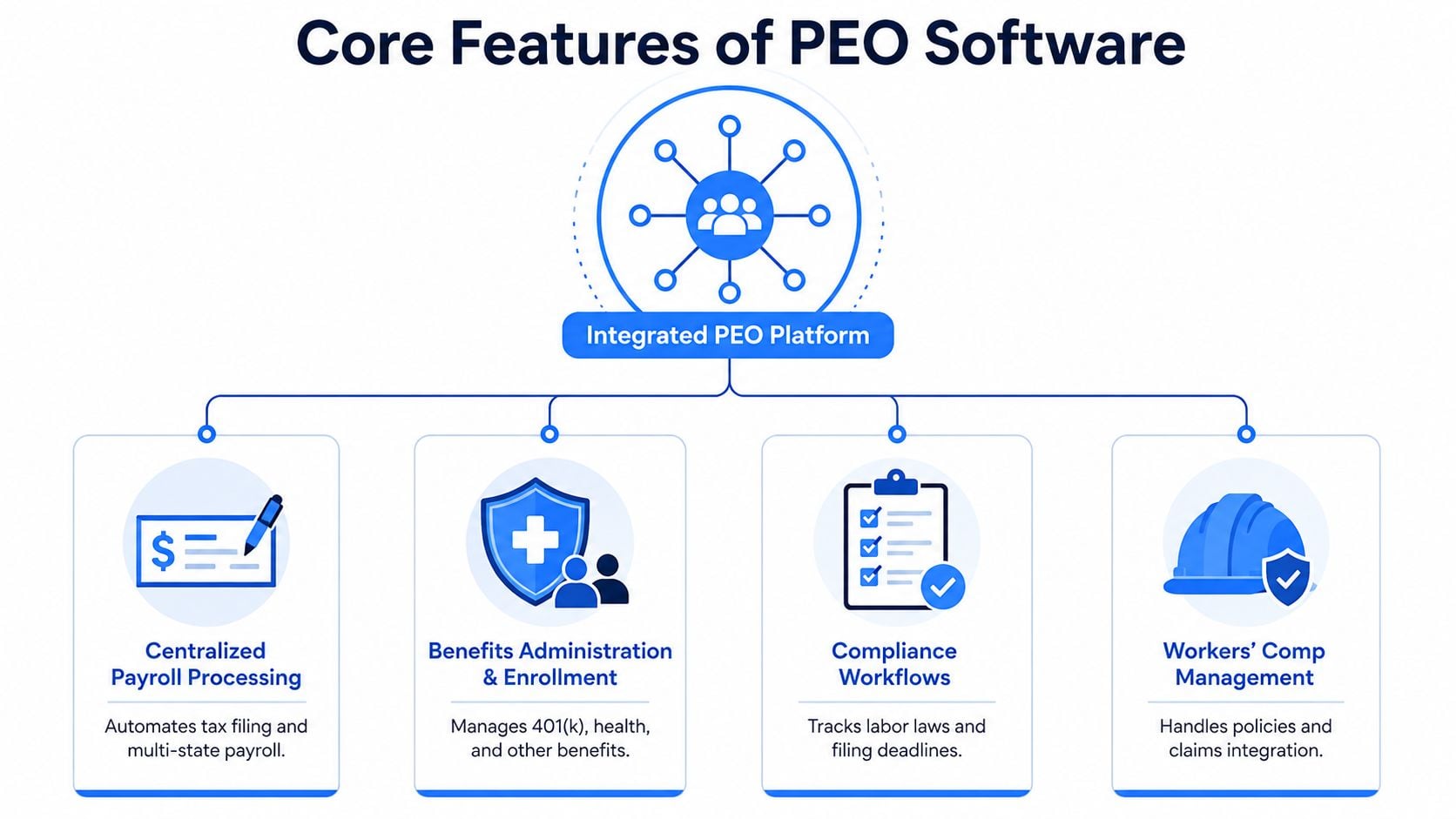
The core modules matter because they connect daily work rather than appearing in the same product menu. A new hire's profile should support onboarding, payroll setup, benefits eligibility, tax handling, compliance tracking, and reporting without requiring the HR team to recreate the same information in separate systems.
Payroll processing as the central workflow
Centralized payroll handles wage calculations, deductions, tax treatment, payment records, and reporting workflows. For a multi-state employer, the important question isn't whether the platform has a payroll button. It's whether the PEO can maintain accurate employee details, apply the right rules, identify exceptions, and document what happened.
A compensation adjustment illustrates the connection. Once approved, it should flow into payroll and the relevant reporting records. Manual re-entry creates avoidable reconciliation work and makes it harder to determine which version of the data is correct.
Benefits and employee changes
Benefits administration covers plan access, eligibility, enrollment, elections, and deductions. The software should connect an employee's election to payroll so the deduction doesn't depend on someone copying a value from an enrollment report.
Benefits also create an employee-experience test. Employees should be able to access enrollment information, pay records, and personal data through a clear portal, while HR and finance should be able to see the administrative status behind those actions.
Compliance, risk, and reporting
Compliance workflows help coordinate federal, state, and local employment requirements, filing deadlines, onboarding documentation, and policy records. Workers' compensation management adds another operational layer, linking policies, classifications, claims information, and risk-related administration.
Reporting completes the system. A CFO may need payroll-cost detail, benefit deductions, employer charges, and liability records in a consistent format. An HR director may need headcount, work locations, employee status, and enrollment information. Both users need confidence that the reports draw from the same underlying records.
The PEO HR technology platform overview is useful for assessing how these capabilities fit together rather than reviewing them as isolated features. Companies comparing a PEO with ordinary payroll products can also use this guide to compare payroll solutions to clarify which responsibilities remain in-house.
Single-source principle: A platform creates value when one approved employee change reaches every workflow that depends on it.
A remote hire in a new state shows the difference between integration and branding. With a connected platform and an experienced PEO team, onboarding can coordinate employee records, payroll setup, benefits eligibility, tax handling, and compliance review in one process. With fragmented tools, the same hire may require repeated data entry, separate confirmations, and manual follow-up across multiple vendors.
PEO Software Versus HRIS HCM and Payroll Tools
The right platform depends on who should retain legal and filing responsibility. An HRIS generally organizes employee records and HR processes. An HCM may add broader workforce management, talent, time, and analytics capabilities. Standalone payroll software processes payroll, but the client generally remains responsible for the underlying employment relationship and filings.
PEO software adds a service and legal structure around the technology. The PEO shares defined employer responsibilities, while the client continues to manage the workforce operationally. That arrangement can reduce the amount of regulatory administration handled directly by the client, but it also introduces dependence on a third party and requires careful contract review.
PEO Software vs HRIS vs Standalone Payroll at a Glance
| Platform Type | Legal Employer Responsibility | Best Fit Scenario |
|---|---|---|
| PEO software | The PEO shares defined employer responsibilities under a co-employment agreement, including specified payroll, benefits, compliance, and workers' compensation administration. | A company wants outsourced employer administration, coordinated multi-state processes, and access to a PEO service model. |
| HRIS or HCM | The client company generally keeps legal employer and employment-tax responsibility. | An organization has internal HR, payroll, finance, and compliance capacity and wants better workforce systems. |
| Standalone payroll | The client generally remains responsible for employment-tax obligations and the employment relationship, even when the vendor processes payroll. | A company wants payroll automation without outsourcing broader HR administration. |
A PEO can make sense for an expanding employer that lacks the internal capacity to manage multi-state payroll, benefits, workers' compensation, and compliance consistently. It may make less sense for a company with a mature HR, tax, legal, and benefits team that wants direct control over plan design, vendor relationships, and operating policies.
The distinction also helps smaller companies avoid overbuying. A business that only needs payroll processing may prefer a focused provider. A business seeking broader guidance should compare the service model, not just the dashboard.
For foundational payroll processes outside a PEO arrangement, a payroll administration guide for startups can help clarify which activities the internal team would own. Companies considering a broader HR system can also review HRIS options for small businesses before deciding whether co-employment is necessary.
Common Pitfalls Security Gaps and Compliance Risks to Watch
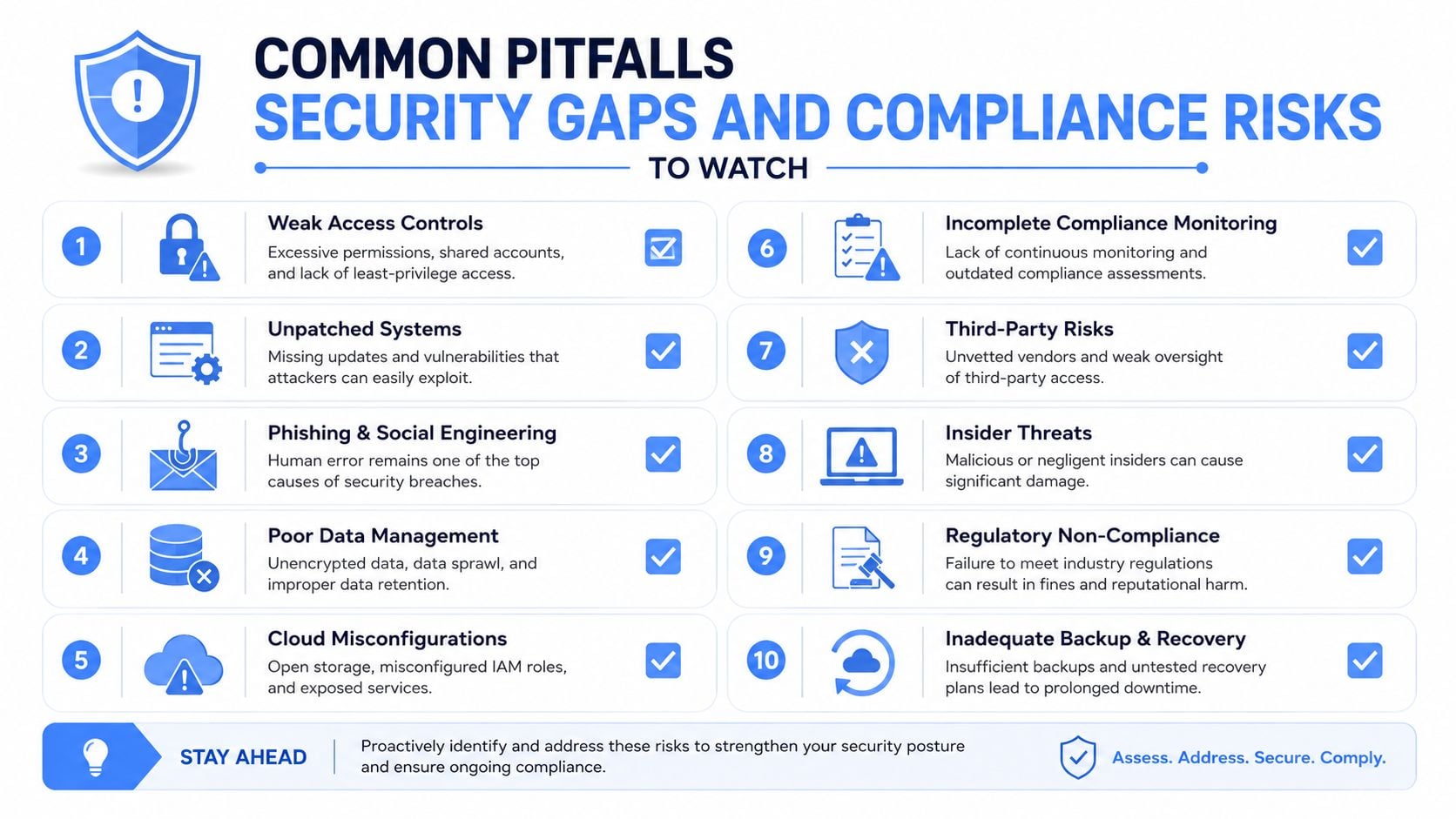
PEO software doesn't automatically make a PEO reliable. A polished portal can sit on top of weak implementation practices, unclear liability language, incomplete compliance coverage, or poor security controls.
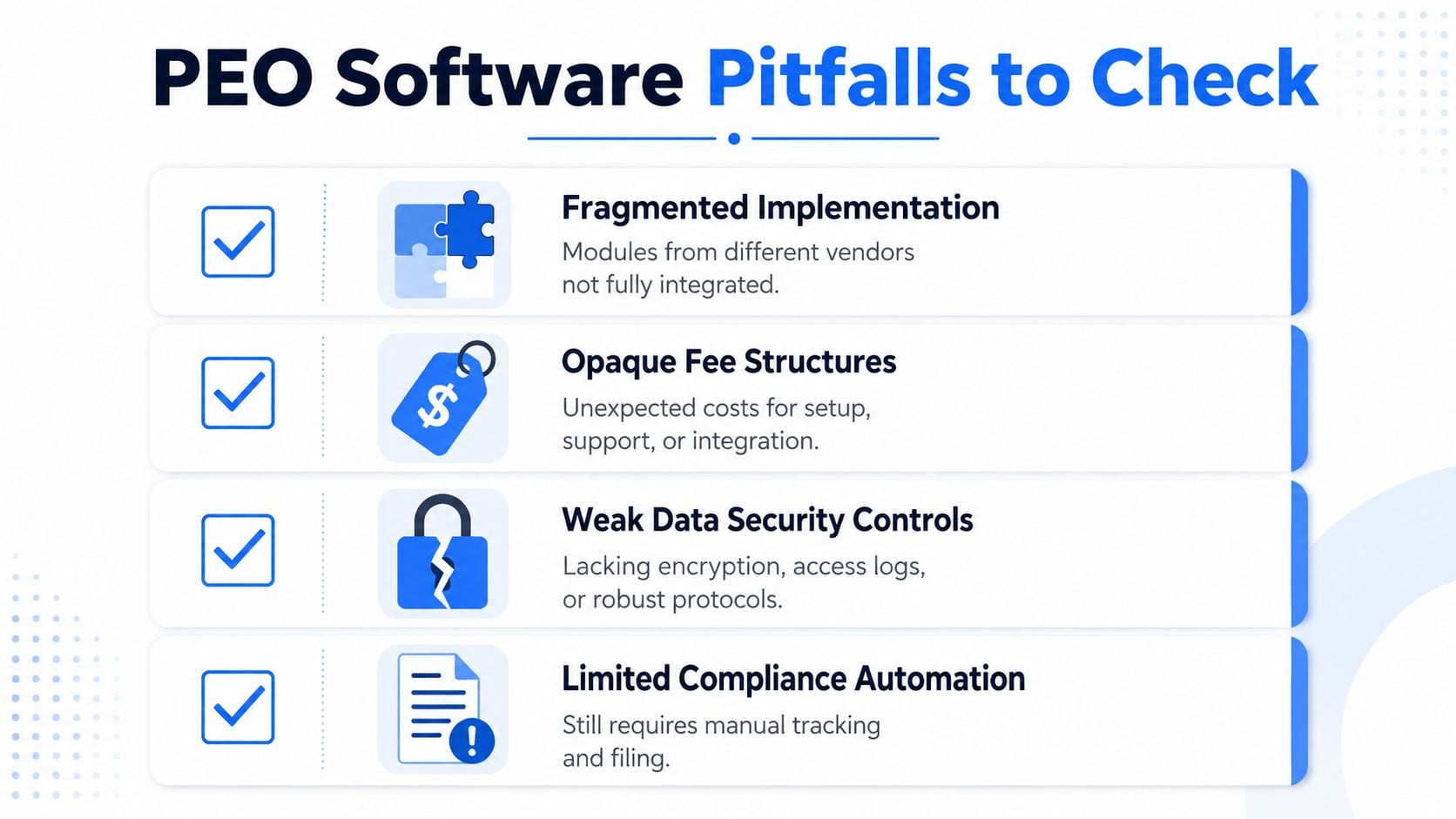
The first risk is fragmented implementation. A provider may describe payroll, benefits, and compliance as integrated, but the actual workflows may depend on separate systems or manual handoffs. Buyers should request a live walkthrough of a new hire, a compensation change, a benefits election, a work-location change, and an employee termination. The objective is to see where data flows automatically and where a service team must intervene.
Fee structure creates a separate risk. A contract may include implementation costs, support charges, integration fees, renewal increases, or pass-through items that don't appear in the headline price. The buyer should request projected total cost, not just a per-employee fee or payroll percentage.
Security deserves operational questions
Employee data includes payroll, tax, benefits, identity, and employment records. The provider should explain role-based access, encryption, access logging, incident response, data retention, backups, and the process for removing access after an employee or administrator leaves.
A vendor that answers with broad assurances but won't explain controls creates a diligence problem. The software should also show which user approved a change, when the change occurred, and whether administrators can export records in a usable format.
Verify external signals
An IRS-certified PEO, or CPEO, must meet requirements under Internal Revenue Code section 7705. The IRS explanation of third-party payer arrangements states that a CPEO agreement affects the employment-tax liabilities of the CPEO and its customers.
The bond requirement provides another concrete check. IRS-certified PEOs must post a bond of up to USD 1 million guaranteeing federal employment-tax liabilities, according to ADP's explanation of CPEO status. Certification can also eliminate the wage-base restart for clients that join or leave a CPEO during the year, which may matter when a company switches providers midyear.
ESAC accreditation offers a different diligence signal. ESAC says its framework uses more than 40 industry standards, and accredited PEOs are backed by more than USD 15 million in bonding. ESAC also verifies federal employment taxes, wages, state employment taxes, health and workers' compensation premiums, and retirement plan contributions, as described in ESAC's accreditation FAQ.
A transaction involving a non-accredited PEO also deserves scrutiny. ESAC requires a new affiliate of an accredited PEO or PEO group to begin accreditation within 120 days and become accredited within 12 months of the transaction. Those timelines, explained in ESAC's standards and procedures, give buyers a specific follow-up point.
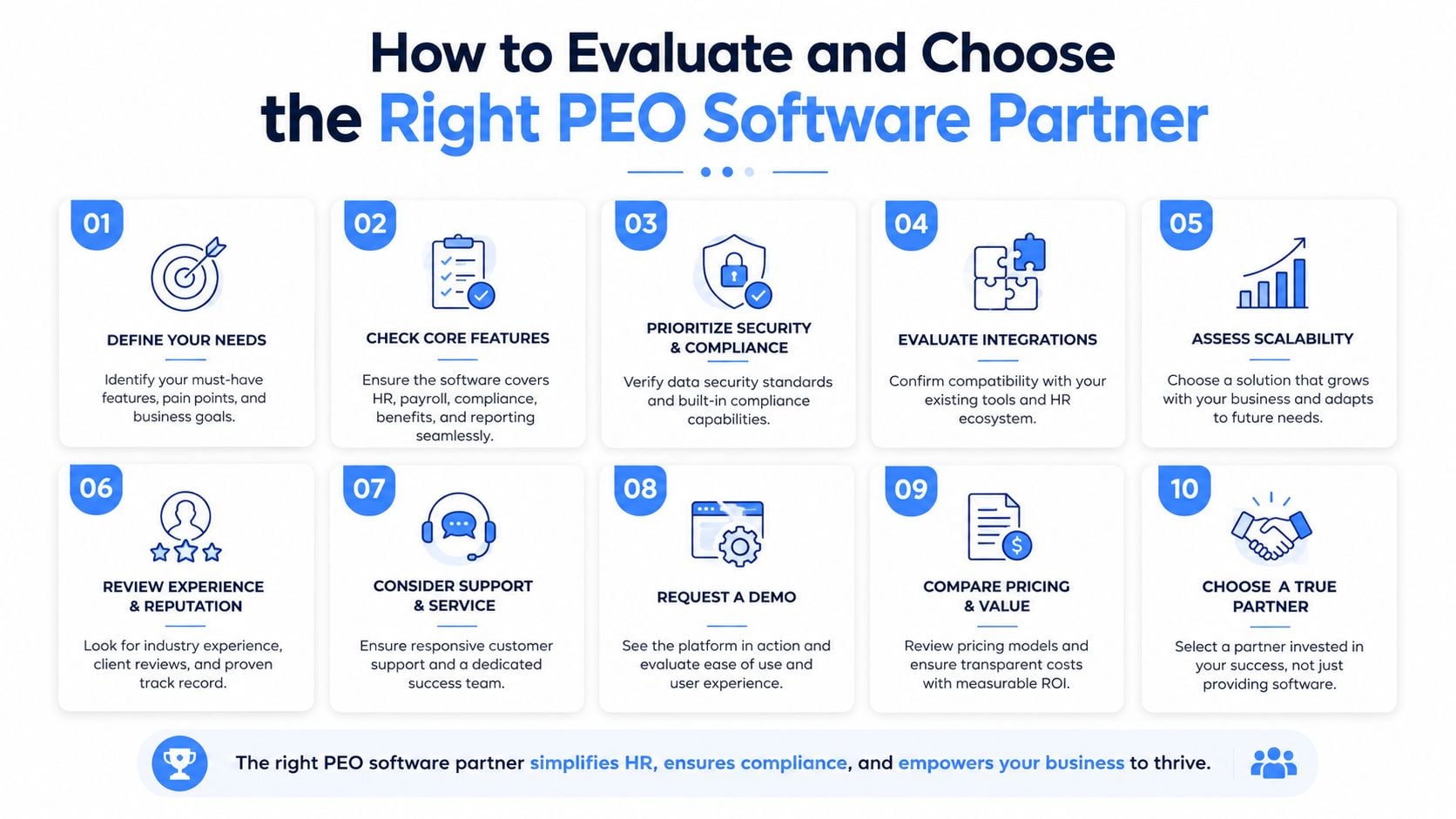
How to Evaluate and Choose the Right PEO Software Partner
A sound evaluation starts before the first demo. The HR director, CFO, payroll owner, legal reviewer, and executive sponsor should agree on the problems the PEO must solve and the responsibilities the company is willing to transfer.
Ask for workflow evidence
A provider should demonstrate the actual processes that affect the company, not only the employee dashboard:
- Multi-state payroll: Ask how the provider handles a new work location, a compensation change, an employee termination, and a correction after payroll approval.
- Benefits integration: Request a demonstration of how an employee's election reaches payroll deductions and reporting.
- Compliance coverage: Ask which federal, state, and local workflows are automated, which are reviewed by specialists, and which remain the client's responsibility.
- Reporting transparency: Request sample payroll, benefits, tax, workers' compensation, and general-ledger reports before signing.
- Service accountability: Ask who owns an urgent payroll issue, how escalation works, and what service-level commitments appear in the agreement.
Good answers include named owners, documented workflows, response commitments, and examples of exception handling. Vague claims about a “dedicated team” don't explain who resolves a failed filing or an incorrect deduction.
Price the relationship, not the screen
The comparison should include projected total cost across three to five providers, including implementation, recurring administration, benefits-related charges, integrations, support, and likely renewal changes. A lower initial fee may not remain lower if the contract permits increases or adds charges for ordinary service requests.
Contract economics deserve the same attention as features. Buyers should ask about fee increases, rate locks, renewal protections, implementation credits, exit terms, data export, transition assistance, and liability language. A provider may offer a strong platform but impose switching conditions that make a future move expensive or operationally disruptive.
The questions to ask PEO providers can help structure demos and identify answers that need written confirmation. Providers should also explain how they protect payroll continuity when a client switches midyear, how prior records transfer, and which party handles historical corrections.
Match the platform to the operating model
First-time buyers should test whether the PEO can provide the administrative depth they lack. Switchers should focus on data migration, benefits continuity, tax history, and exit obligations. Renewing clients should benchmark current pricing and service against alternatives before accepting new terms.
A useful scorecard separates technology fit, service quality, compliance coverage, benefits, total cost, and contract risk. That prevents a visually impressive portal from outweighing weak reporting or restrictive renewal language.
Key Takeaways for Making a Confident PEO Decision
PEO software is best understood as the operating layer for a co-employment relationship. It connects payroll, benefits, compliance, workers' compensation, employee data, and reporting while the PEO shares defined employer responsibilities with the client company.
The decision should reflect the buyer's situation:
- Owners renewing a contract should review fee increases, renewal protections, exit terms, and service performance before accepting new pricing.
- HR leaders evaluating providers should test real workflows, especially onboarding, work-location changes, benefits elections, payroll corrections, and employee terminations.
- CFOs benchmarking costs should compare projected total cost, benefits economics, implementation charges, support fees, and liability language across multiple providers.
Three decisions should be documented before providers are contacted:
- Responsibilities: Which payroll, tax, benefits, compliance, and workers' compensation duties should move to the PEO?
- Evidence: Which workflows, reports, security controls, certifications, and service commitments must the provider demonstrate?
- Economics: Which contract terms, rate protections, implementation concessions, exit rights, and transition obligations are essential?
A PEO platform can reduce administrative fragmentation, but only when the technology, service model, and contract all support the same operating outcome. Independent side-by-side analysis can help employers compare pricing, benefits, compliance support, technology fit, and switching risk without treating a sales demonstration as due diligence.
PEO Metrics helps HR, finance, and leadership teams compare, select, and negotiate PEO relationships using side-by-side analysis of pricing, benefits, contract terms, service quality, compliance support, and industry fit. Visit PEO Metrics to evaluate provider options, identify contract risks, and build a more informed PEO decision.
