
The PEO agreement is signed, the kickoff call is on the calendar, and then an HR director gets the email that changes the tone of the whole project: “Please send all employee data for migration.”
That's the moment many teams make the wrong call. They treat data migration like an IT hand-off. In a PEO switch, it isn't. It's a business continuity project with payroll, benefits, compliance, employee trust, and cash flow sitting directly on top of it.
For a company with a lean HR team, the risk shows up fast. One bad deduction code can throw off a payroll. One missed eligibility date can lock someone out of benefits enrollment. One broken tax setup can create a filing mess that takes months to unwind. Finance feels it in rework and penalties. HR feels it in employee complaints. Leadership feels it when Monday morning starts with a queue of issues instead of a clean launch.
PEO migrations are also unusually messy because the data isn't sitting in one clean system. Employee census data may live in the current PEO portal, payroll adjustments in exports, PTO balances in spreadsheets, benefits elections in carrier files, and job or compensation history in an HRIS that was only partially maintained. The transition can look simple on a vendor project plan and still fail in practice because the company moved records, not business logic.
That's why the right owner usually isn't just IT. It's a cross-functional lead, often HR or finance, who understands what has to work on day one and what can wait. Contract terms also matter more than many buyers expect. Access rights, extract formats, and timing obligations can shape the migration before the first file is ever pulled, which is why a review of PEO data ownership clauses and exit terms is worth doing early.
Some of the most useful migration advice comes from outside HR tech as well. The same discipline seen in expert advice on SharePoint migrations applies here: inventory first, reduce scope, test in phases, and keep a clear rollback path.
Table of Contents
- Before You Move a Single File
- From Messy to Mapped
- Mitigating Risk with Phased Testing and Validation
- Executing the Cutover
- The First 30 Days
Before You Move a Single File
A bad migration usually starts with a well-meaning sentence: “Let's just move everything.”
That instinct creates cost, confusion, and avoidable risk. One of the more useful points in modern migration guidance is that the core question isn't only how to move data. It's what not to migrate, and how to prove that decision is safe. Best practices recommend prioritizing the data most valuable for immediate transfer based on business criticality, compliance, access frequency, and dependencies, as noted in Alation's migration planning guidance.
Use a PEO data triage model
For HR and finance leaders, the cleanest way to start is a three-bucket triage:
| Bucket | What it means | PEO example |
|---|---|---|
| Migrate | Data needed for live operations, compliance, or active employee support | Current employee census, bank details, tax elections, active garnishments, benefit enrollments, PTO balances |
| Archive | Data that must be retained but doesn't need to sit in the new PEO on day one | Prior review notes, closed leave cases, old payroll registers, historical onboarding documents |
| Retire | Data with no meaningful operational use and no retention reason | Duplicative exports, abandoned custom fields, outdated code tables, legacy test records |
This sounds simple until the team has to make real decisions. A five-year-old performance review may matter for internal history but not for payroll or open enrollment. Active 401(k) loan deductions, by contrast, need tight handling because they affect current payroll and employee obligations. Old COBRA notices may belong in a defensible archive, not in the live platform. The company needs a documented rationale for each call.
Practical rule: If a record drives pay, eligibility, tax handling, deductions, or a live employee service issue, assume it belongs in the migration scope until someone proves otherwise.
What belongs in each bucket
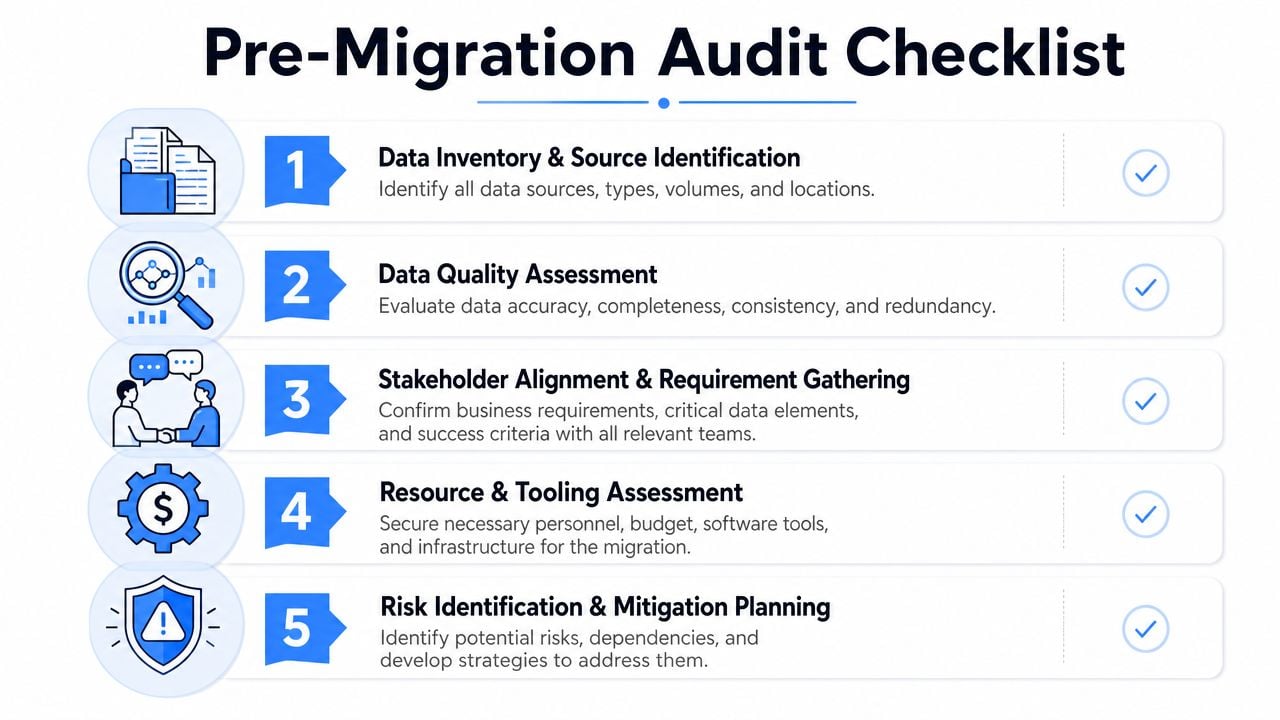
The pre-migration audit should answer five business questions, not just technical ones:
- What must work on the first payroll? Bank accounts, tax setup, earnings and deduction codes, direct deposit allocations, garnishments, and active compensation records belong at the top.
- What affects benefits access? Eligibility dates, class structures, dependent data, plan elections, and carrier feed fields need separate review because small mapping mistakes create visible employee issues.
- What has a retention requirement? HR should identify records that must be preserved even if they aren't loaded into the new system.
- What is referenced often enough to justify migration? Some historical records are used constantly. Others are almost never touched and are better archived.
- What is expensive to carry forward? Every extra field, file set, and exception adds testing work.
A short governance session with HR, payroll, finance, and the implementation lead usually saves more time than any cleanup sprint done in isolation. A practical working document can live in a shared tracker, but it should include owner, source, target decision, retention note, validation method, and cutoff timing. For teams that want a structured starting point, a PEO integration governance audit checklist helps frame those decisions before the vendor starts loading files.
From Messy to Mapped
Most PEO data problems don't come from the transfer itself. They come from hidden inconsistency inside the source data.
That's why data migration best practices treat migration as a data quality and governance project, not just a system move. One major guide notes that 50% of enterprises plan to invest $500,000 or more in data integration in the next year, which shows how expensive these programs have become and why the stakes are so high for data loss, downtime, and compliance exposure, according to The Groove's data migration best practices.
Why lift and shift breaks in PEO migrations
PEO data rarely moves cleanly from one structure to another. The old system may allow free-text job titles. The new one may require standardized job codes. The old provider may track PTO as one combined bucket. The new one may split vacation, sick, and local statutory leave into separate policies with different carry rules.
A straight export-import approach fails because the target system isn't asking for the same thing.
Consider a simple PTO scenario. In the source system, an employee has one “Paid Time Off” balance. In the target PEO, the implementation team needs separate values for vacation balance, sick balance, accrual method, anniversary rule, carry handling, and maximum cap behavior. There is no magic field that solves that mismatch. Someone has to define the business rule.
A practical mapping example
The safest way to handle this is with a field-by-field mapping document. Not a generic spreadsheet with source and target tabs. A real control document.
A useful version includes:
- Source field name and where it comes from
- Target field name in the new PEO
- Transformation rule if values need to be split, merged, reformatted, or standardized
- Owner for approval, usually HR, payroll, finance, or benefits
- Validation method, such as record counts, sample review, or payroll comparison
- Exception handling note for records that don't fit the rule
Here's the kind of issue that shows up quickly:
| Source value | Problem | Target handling |
|---|---|---|
| Sales Rep | Multiple title variations exist | Standardize to approved job title |
| sales rep | Same role, different casing | Merge into same target value |
| Sales Representative | Longer version of same role | Map to same target job code |
| Sr Sales Rep | Ambiguous seniority | Review against compensation band and manager roster |
HR knowledge takes precedence over system knowledge. A migration analyst can map fields. HR has to decide what the data should mean in the new operating model.
Bad source data becomes expensive after go-live because it stops looking like a migration issue and starts showing up as payroll discrepancies, broken reports, and eligibility disputes.
For companies switching PEOs while keeping an HRIS, mapping decisions also have to account for how systems will exchange data after launch. If the new provider expects one class code and the HRIS still stores another, the company creates a recurring reconciliation problem instead of fixing it during implementation. That's why PEO HR systems interoperability planning should happen during mapping, not after cutover.
Mitigating Risk with Phased Testing and Validation
The highest-risk phrase in a PEO migration is “We'll switch everything over at once and sort out the rest after go-live.”
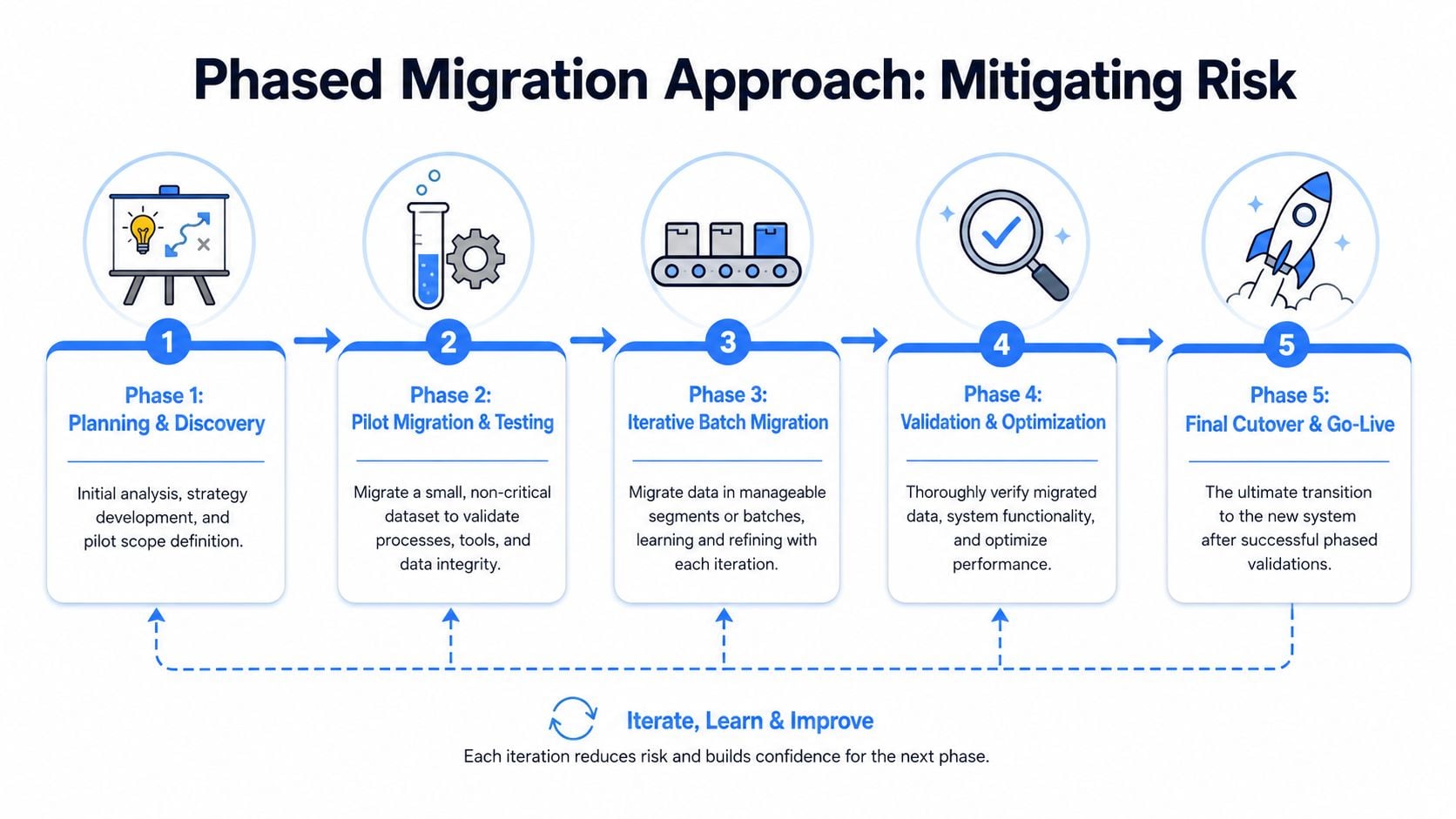
That's the big-bang approach. It looks efficient on paper because there is one date, one cutover, and one push. In practice, it concentrates every possible failure into the same window. If payroll data, benefits eligibility, tax settings, deduction logic, and banking details all change at once, the company loses the ability to isolate what broke.
A more reliable standard is a phased migration. Widely cited migration guidance recommends phased movement over a single big-bang cutover when systems are complex or downtime is costly because teams can compare source and target systems under controlled conditions, run parallel tests, and validate results before retiring the legacy environment, as explained in Streamkap's data migration best practices.
What phased testing looks like in a PEO switch
In a PEO project, the phases should follow business risk, not technical convenience.
A practical sequence often looks like this:
- Core employee census first. Legal names, addresses, hire dates, Social Security numbers, work states, pay groups, and reporting relationships.
- Payroll configuration second. Earnings codes, deduction codes, tax profiles, direct deposit structures, garnishments, and general ledger mapping.
- Benefits and leave rules third. Eligibility classes, dependent structures, plan elections, waiting periods, PTO or leave balances, and accrual logic.
- Historical or reference data last. Prior payroll history, archived documents, prior year summaries, and non-operational reporting records.
The test method should also change by phase. Census data needs record-by-record checks. Payroll setup needs line-by-line comparison. Benefits requires scenario testing, such as new hire eligibility, dependent enrollment changes, and termination handling.
Set go and no-go rules before testing starts
Many teams test diligently and still make poor cutover decisions because they never defined success in advance.
For payroll, a useful parallel test looks like this:
- Run a mock payroll in the new system using the same employee population and pay period inputs as the current one.
- Compare gross pay, deductions, taxes, net pay, and funding totals by employee.
- Review exceptions one by one instead of accepting a summary-level tie-out.
- Require sign-off from payroll and finance, not just the implementation team.
The same discipline applies outside payroll:
- Benefits checks should confirm eligibility dates, plan assignments, and deduction alignment.
- Employee data checks should sample new hires, terminated staff, leaves, and status changes.
- Compliance checks should confirm tax jurisdiction setup and access controls.
The point of phased testing isn't to make the project slower. It's to make the failures smaller.
Good teams also build buffer time between phases. If the demographic load uncovers location coding issues, that fix should happen before payroll testing begins. Otherwise, the same defect contaminates every later phase and the team starts debugging noise instead of root cause.
Executing the Cutover
A cutover weekend shouldn't feel dramatic. If it does, the planning was too thin.
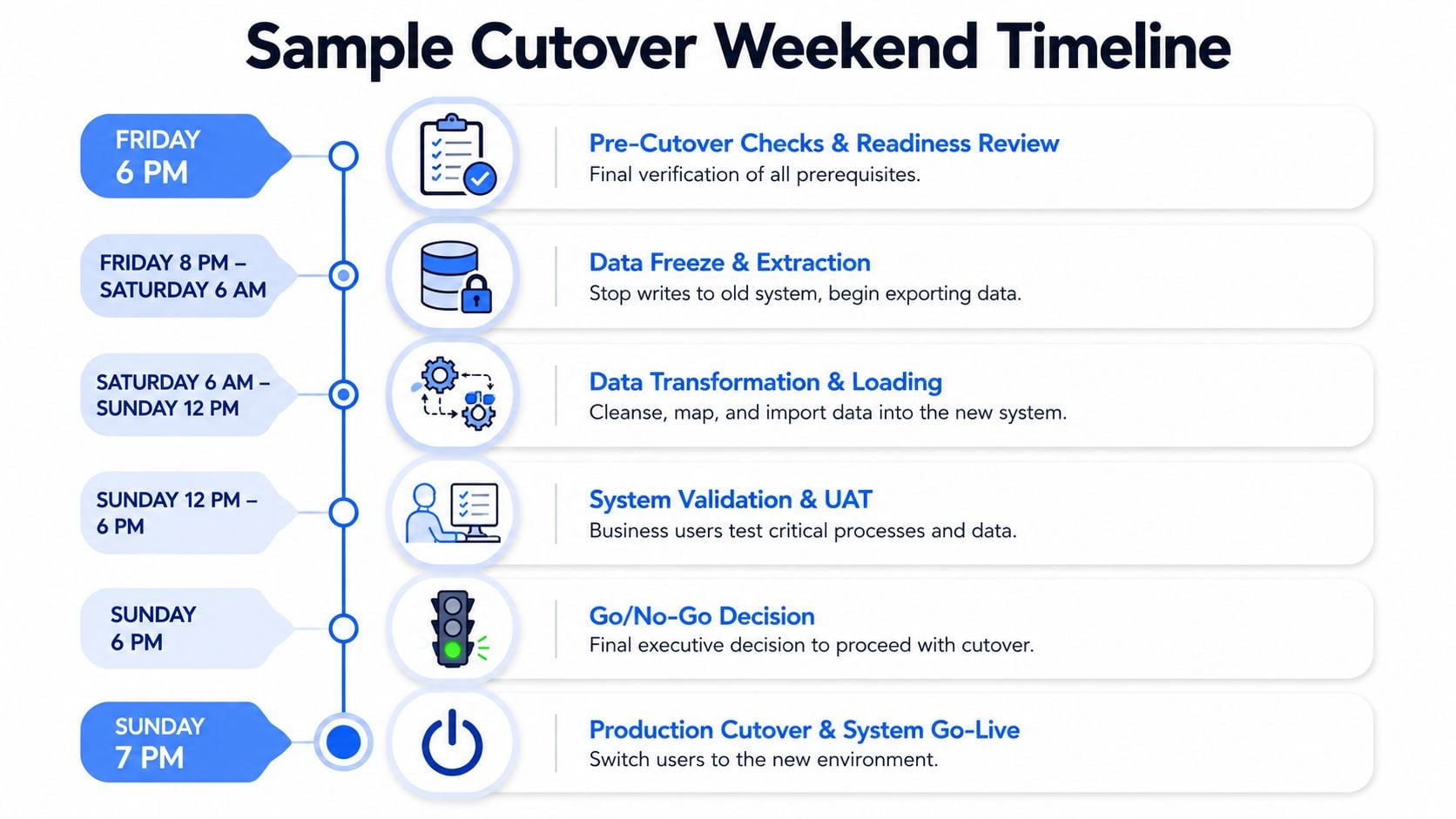
The cleanest migrations use a written runbook with timestamps, named owners, validation steps, communication triggers, and rollback actions. That document matters more than a polished project timeline because it tells the team what to do when a file fails, a count doesn't match, or an executive asks whether Monday payroll is safe.
A sample cutover weekend
A typical weekend runbook for a PEO switch might look like this:
| Time | Action | Owner |
|---|---|---|
| Friday evening | Readiness review, final approvals, employee communications reminder | HR, payroll, project lead |
| Friday night | Freeze changes in the source environment and pull final extracts | Current provider, internal owner |
| Saturday morning | Transform and load approved datasets into the new system | New provider implementation team |
| Saturday afternoon | Validate counts, required fields, and critical records | HR and payroll SMEs |
| Sunday morning | Run user acceptance checks for payroll, benefits, and employee access | Business leads |
| Sunday evening | Go or no-go call, production cutover, final communication | Executive sponsor, HR, payroll |
The practical issue is that cutover tasks are rarely limited to data movement. Teams also have to account for login setup, employee self-service communications, manager permissions, funding instructions, and carrier or banking dependencies. A missed handoff in any of those areas can make a technically successful migration feel like a failed launch.
Rollback has to be operational, not theoretical
Many project plans say “rollback available” and stop there. That isn't enough.
A real rollback plan answers four questions:
- What event triggers rollback
- Who has authority to call it
- What system or process resumes
- How employees and managers will be informed
For example, if final validation shows material mismatch in direct deposit data, the company may decide the risk to payroll is too high and continue processing the next payroll in the old environment. If benefit eligibility files fail and employees cannot access coverage-related functions, the company may still proceed with payroll go-live but keep a manual support process in place. Not every defect requires a full reversal. Some require targeted contingency handling.
Keep the old environment usable until the business proves the new one can carry payroll and benefits without heroics.
Backup discipline matters here too. If a source export is corrupted or a local file is lost during the final handoff, the company needs a way to recover the underlying data quickly. That's one reason some teams line up support options such as hard drive and data recovery services when handling legacy exports or one-time local archives during a transition.
A related operational issue is acquisition-driven change, where payroll structures are already moving underneath the migration. In those cases, PEO payroll migration during acquisition planning should be folded directly into the cutover runbook because employee populations, entity codes, and reporting lines can shift late in the process.
The First 30 Days
Go-live is not the finish line. It's the start of a proving period.
One of the biggest gaps in migration planning is the operating model after cutover. Current guidance is moving beyond one-time reconciliation and toward observability, audit trails, and ongoing monitoring because migration failure often appears later as a data-quality or performance problem during normal operations, as outlined in Fivetran's data migration guide.
What to monitor after go-live
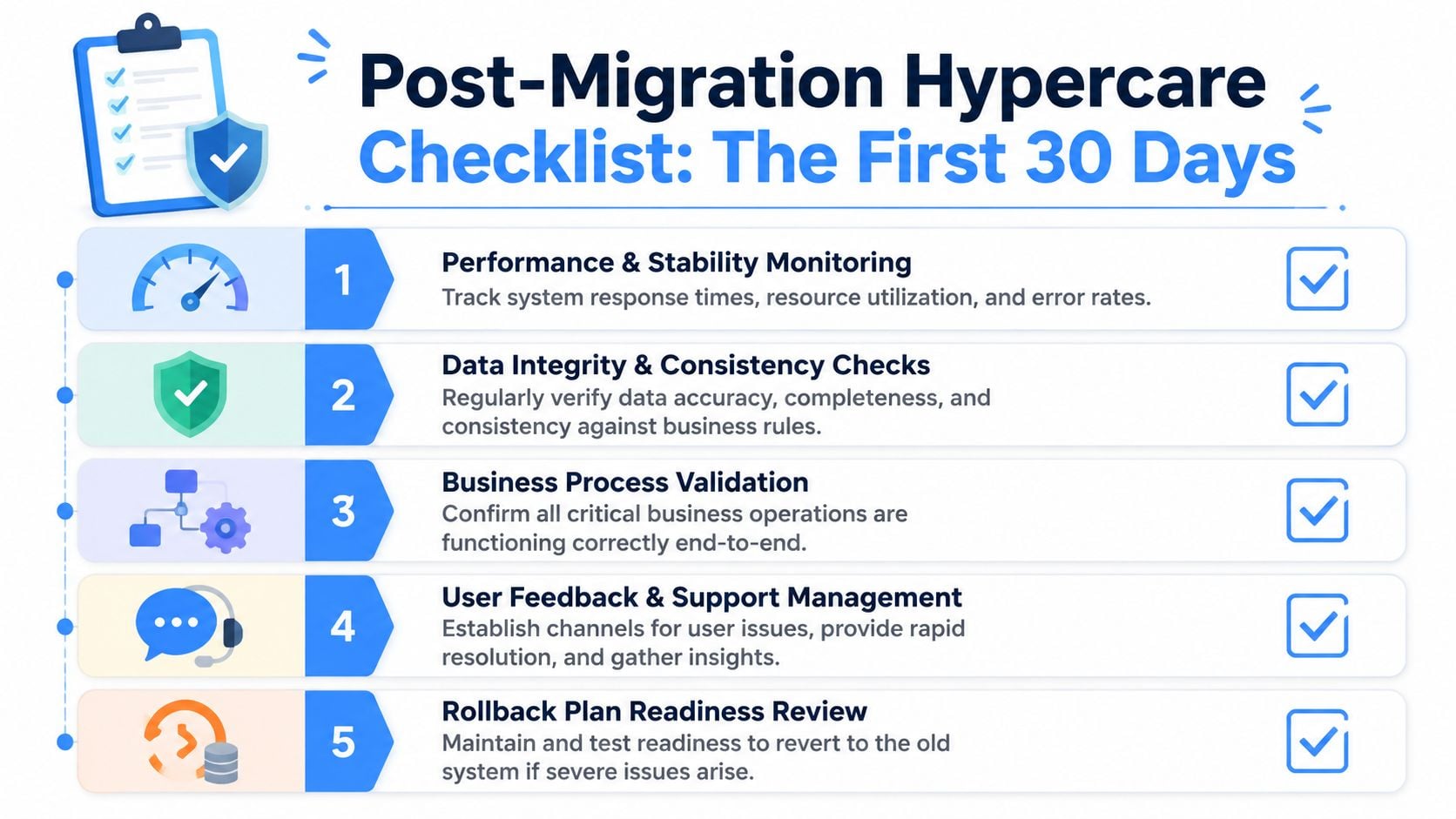
The first month should have a formal hypercare checklist with named owners and review dates.
Core items include:
- First payroll reconciliation. Match employee-level gross-to-net output, tax treatment, deductions, and funding details against expectations.
- Benefits audit. Compare plan elections, coverage tiers, employer contributions, and dependent records against enrollment source files.
- PTO and leave review. Confirm beginning balances, accrual behavior, carry rules, and leave status handling.
- Employee access checks. Track whether employees can log in, view pay statements, update profiles, and complete required self-service tasks.
- Exception log management. Keep one shared list with issue owner, severity, root cause, workaround, and target resolution date.
This is also where many companies discover whether the new operating model works. A deduction that looked right in a test file may fail when an employee changes coverage mid-cycle. A manager hierarchy may look fine in a sample but break approval routing in a live onboarding event.
How leaders should judge success
Success in the first month isn't “the system stayed up.” It's whether HR and finance can run ordinary business without building manual workarounds around the new provider.
A simple leadership review can ask:
| Question | Healthy answer |
|---|---|
| Did the first payroll run cleanly? | Minor exceptions only, resolved quickly |
| Are benefits deductions and enrollments aligned? | Yes, with documented corrections where needed |
| Are employees able to self-serve? | Access issues are isolated, not systemic |
| Are open issues shrinking? | Yes, by severity and count |
| Is the legacy system still needed for routine work? | Only for archive/reference, not daily operations |
That final point matters. If HR still has to keep a shadow spreadsheet for PTO, or payroll still checks the old system before every run, the migration isn't complete. The company has just moved the problem.
For teams that want a more structured post-go-live review, a PEO HR technology integration checklist can help organize the first-month audit across payroll, benefits, permissions, and reporting. And when leadership needs outside support comparing provider capabilities, implementation trade-offs, and contract terms, PEO Metrics is one advisory option that analyzes PEO pricing, service model, benefits structure, and transition risk for employers evaluating a switch.
A smooth PEO migration doesn't come from moving files faster. It comes from narrowing scope, cleaning data before it spreads errors, testing in controlled phases, running a disciplined cutover, and treating the first month as part of the migration itself. That's what data migration best practices look like when payroll, benefits, and employee trust are on the line.
A PEO switch is often won or lost in the details that vendors gloss over: data ownership, implementation scope, payroll setup, benefits mapping, and contract language that affects how cleanly a company can exit and transition. PEO Metrics helps employers compare PEO options, review migration and service trade-offs, and negotiate stronger terms before those risks become expensive operational problems.
