
The first sign is usually boring, not dramatic. A founder asks for a headcount report, payroll needs a clean export, and someone on the team is still updating leave balances in a spreadsheet with three tabs and no audit trail. By the time a business reaches that point, the question isn’t whether HR admin has become painful, it’s whether the company can keep absorbing that risk without paying for it later.
Table of Contents
- The Spreadsheet Trap Small Businesses Can’t Afford to Ignore
- What an HRIS Does for a Small Business
- Core Features That Matter and Features That Are Noise
- The Total Cost of HRIS for Small Businesses
- Implementation Timeline and the Hidden Costs Most Buyers Miss
- How HRIS and PEOs Work Together or Against Each Other
- Vendor-Agnostic HRIS Selection Checklist
- Your 30-Day Action Plan for Choosing and Implementing HRIS
The Spreadsheet Trap Small Businesses Can’t Afford to Ignore
The spreadsheet phase always feels temporary right up until it doesn’t. Employee records sit in one file, payroll corrections live in another, and leave requests get handled in email threads or Slack. That works when the business is tiny, but it turns into a compliance and coordination problem as soon as managers need reliable data fast.
A 2022 industry survey found that 51% of small businesses still used spreadsheets and 19% relied on outdated manual or paper processes (Software Path). That’s not a software preference, it’s a warning sign. If records are scattered, one missed change in pay, tax status, or eligibility can ripple into payroll errors, compliance gaps, and painful cleanup work.
Practical rule: if a manager has to ask three people for the same employee record, the business already has a system problem.
A lot of owners keep the spreadsheet setup because it looks cheap. It isn’t cheap once the admin burden shows up in missed deadlines, duplicate entry, and the time managers spend reconciling data that should already match. For readers comparing options, a useful place to start is the independent overview of top UK HRIS platforms for small business, then pressure-test those tools against how your own payroll and compliance process works.
The key operational risk is hidden in plain sight. Every extra spreadsheet increases the chance that someone is working from stale information, and that’s exactly where payroll, onboarding, and leave tracking start to drift apart. A better model is to treat HRIS not as a nice-to-have, but as the point where employee data stops being a patchwork and starts becoming a controlled process. For teams also thinking about whether HR should stay in-house or be partially outsourced, the structure of group management and payroll matters because fragmented systems make that decision harder, not easier.
What an HRIS Does for a Small Business
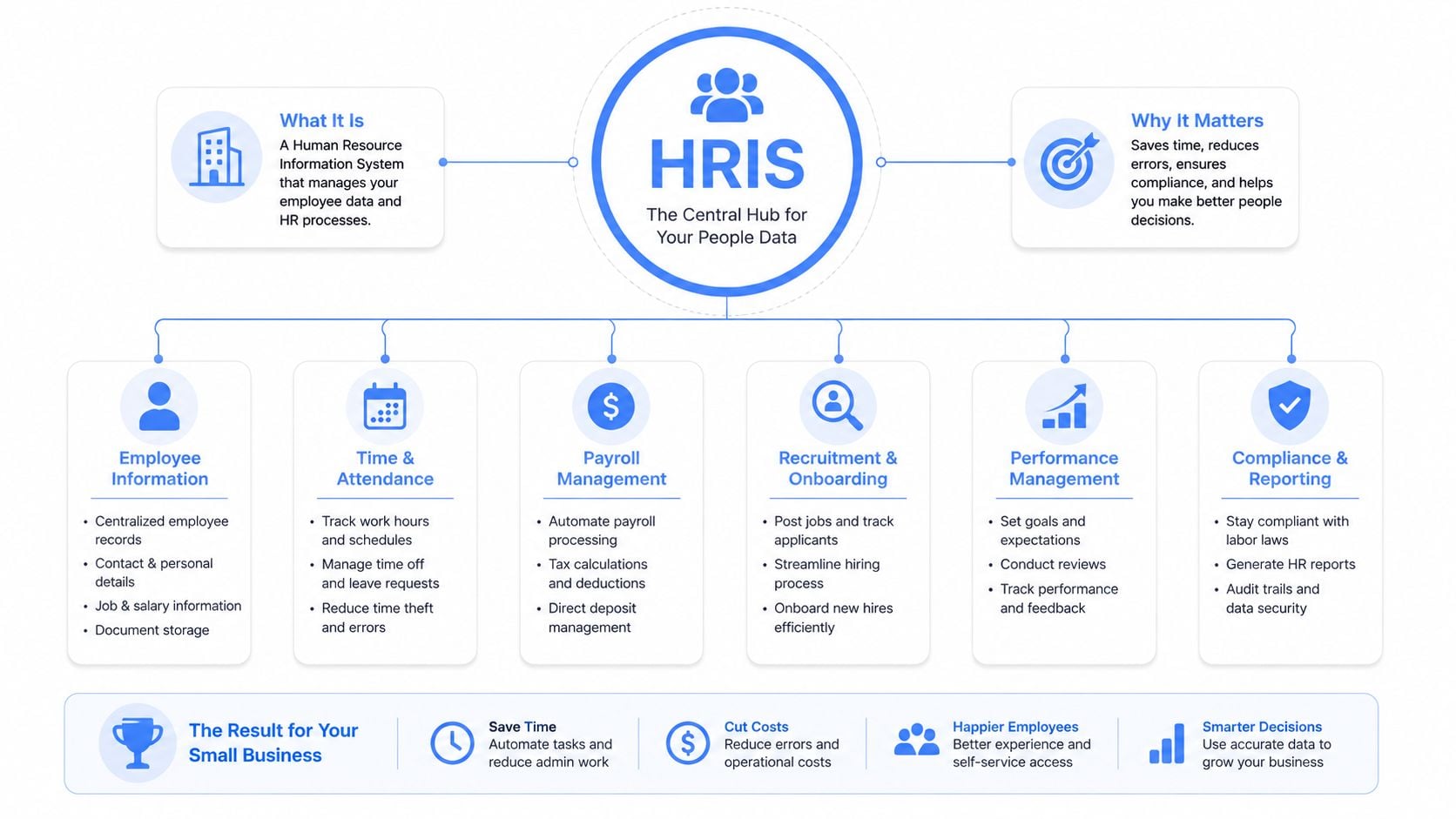
A small business HRIS is the system of record for employee and contractor data. It keeps profiles, compensation history, documents, time off, and workflow approvals in one place, so the same record does not need to be retyped into payroll, onboarding, and benefits tools. That central record is the point. The vendor brand is not.
When the HRIS, payroll, and timekeeping layers connect, the business can automate direct deposit, payroll tax filings, and state reporting instead of cleaning up those tasks by hand (Bolto). That improves both efficiency and data integrity. Fewer disconnected systems mean fewer places where a typo, stale form, or missed update can break the payroll cycle.
Cloud became the default architecture
The market has already made the architectural call. In a 2022 HRIS research report based on 587 selection projects, 98% of companies were considering a cloud-based HRIS, and only 2% were contemplating on-premises systems (Software Path). That does not mean every cloud product is good, but it does show where buyers have settled.
For small businesses, a cloud-first HRIS reduces the need to maintain local infrastructure and makes self-service, mobile access, and distributed admin workflows easier to support. It also fits the way SMBs operate, with lean teams, limited HR capacity, and pressure to move quickly without adding technical overhead.
The right HRIS does not replace HR judgment, it removes the clerical work that keeps HR from doing its job.
That distinction matters for companies weighing HRIS decisions against human resources outsourcing options. A PEO can absorb part of the compliance burden, but it does not remove the need for clean employee data, consistent workflows, and a reliable record of who changed what. If the HRIS is weak, the PEO relationship inherits the mess. If the HRIS is strong, the business keeps better control of the data that drives payroll, onboarding, and day-to-day people operations.
Core Features That Matter and Features That Are Noise
The best small-business HRIS setup is usually lean because it has to solve real work, not impress people in a demo. The right system handles the daily admin that slows a small team down, while leaving out the extras that add setup time, training, and ongoing cleanup. That usually means choosing features that support payroll, onboarding, and compliance first, then being strict about anything that looks overly complex but does not reduce effort in practice.
Prioritize the functions that remove manual work
The highest-value stack includes employee self-service, mobile access, role-based permissions, e-signature onboarding, and compliance storage for documents like I-9s and W-4s (SHRM). Those capabilities cut admin time because employees can update their own details, managers can approve within their scope, and HR does not have to chase paperwork by email.
The same guidance points to exportable reporting, ATS integrations, accounting integrations, and per-employee pricing as better buying signals than flashy dashboards. For SMBs, pricing often falls around $6 to $20 per employee per month, with entry plans sometimes starting near $8 to $40 monthly plus per-user fees (SHRM). That range matters because it separates the sticker price from the actual operating cost, especially once you factor in onboarding support, integrations, and the admin time someone has to spend inside the system.
Deprioritize features that add complexity without payoff
Advanced predictive analytics sounds useful, but most small companies do not have the data discipline or decision cadence to get value from it yet. Multi-layer approval routing falls into the same bucket. It can make sense in larger organizations, but for a lean team it often creates bottlenecks instead of control.
| HRIS Features: Essential vs. Overkill for Small Businesses | |
|---|---|
| Essential (Prioritize) | Overkill (Deprioritize) |
| Employee self-service portals | Advanced predictive analytics |
| Mobile access for managers and staff | Multi-layer approval routing |
| Role-based permissions | Heavy customization that slows rollout |
| E-signature onboarding | Enterprise-style workflow sprawl |
| Compliance document storage | Features that duplicate other systems |
| Exportable reporting | Reporting that cannot be reused outside the platform |
| ATS and accounting integrations | Standalone tools that create more sync work |
| Per-employee pricing clarity | Bundles with unclear add-on costs |
A practical market view is useful here, and the Talantrix HR software roundup can help with vendor comparison. The filter should still be simple. If a feature does not reduce manual handling, support compliance, improve data portability, or make the HRIS easier to reconcile with a PEO, it belongs lower on the list. That matters because a small business that overbuys features usually pays twice, once in subscription fees and again in the work needed to keep the system aligned with payroll, onboarding, and any outsourced HR arrangement.
The Total Cost of HRIS for Small Businesses
CFOs usually start with subscription price, and that is the wrong first question. The better question is what the software costs across the full work cycle, including migration, integrations, admin time, and error recovery. A cheap HRIS can become expensive fast if it creates more reconciliation than it removes.
The pricing spread is wide enough to distort early planning. Analysts at Software Path reported an average HRIS budget of $6,125 per user over five years across businesses, while firms with 0 to 99 employees averaged $6,000 per user over the same period. A separate 2022 report found an average budget per user of $12,625, or about $210 per user per month, across all companies (Software Path). Those figures are not meant to be copied into a quote sheet, they show how much pricing can swing depending on scope and segment.
Usage intensity changes the math
Small businesses also use their HRIS more intensively. Analysts at Software Path reported that 10.23% of employees in small businesses used their HRIS, compared with 4% across businesses of all sizes. That matters in a lean team, because a larger share of the workforce touches the system directly or depends on it for payroll, onboarding, or policy access.
A separate survey found that 69% of users said HR software reduced payroll processing time and 25% reported improved legal compliance after implementation. Those are the kinds of gains that show up on the finance side, not just the HR side. Less time spent on payroll correction means fewer interruptions, fewer late-night fixes, and fewer internal handoffs.
The hidden cost sits in reconciliation
The cheapest plan often fails because it does not integrate cleanly with payroll or with a PEO setup. Every manual export, import, and check adds labor, and labor is where small-business software budgets usually leak. A platform with stronger payroll linkage can cost more up front and still come out cheaper over a year because it removes duplicate work.
That trade-off matters even more when a business is comparing HR software with outsourcing. What it costs to outsource HR is a useful reference point when the decision is software versus service, or a mix of both. The Talantrix HR software roundup can help surface shortlists, but the right lens is total cost of ownership, not monthly subscription alone.
Implementation Timeline and the Hidden Costs Most Buyers Miss
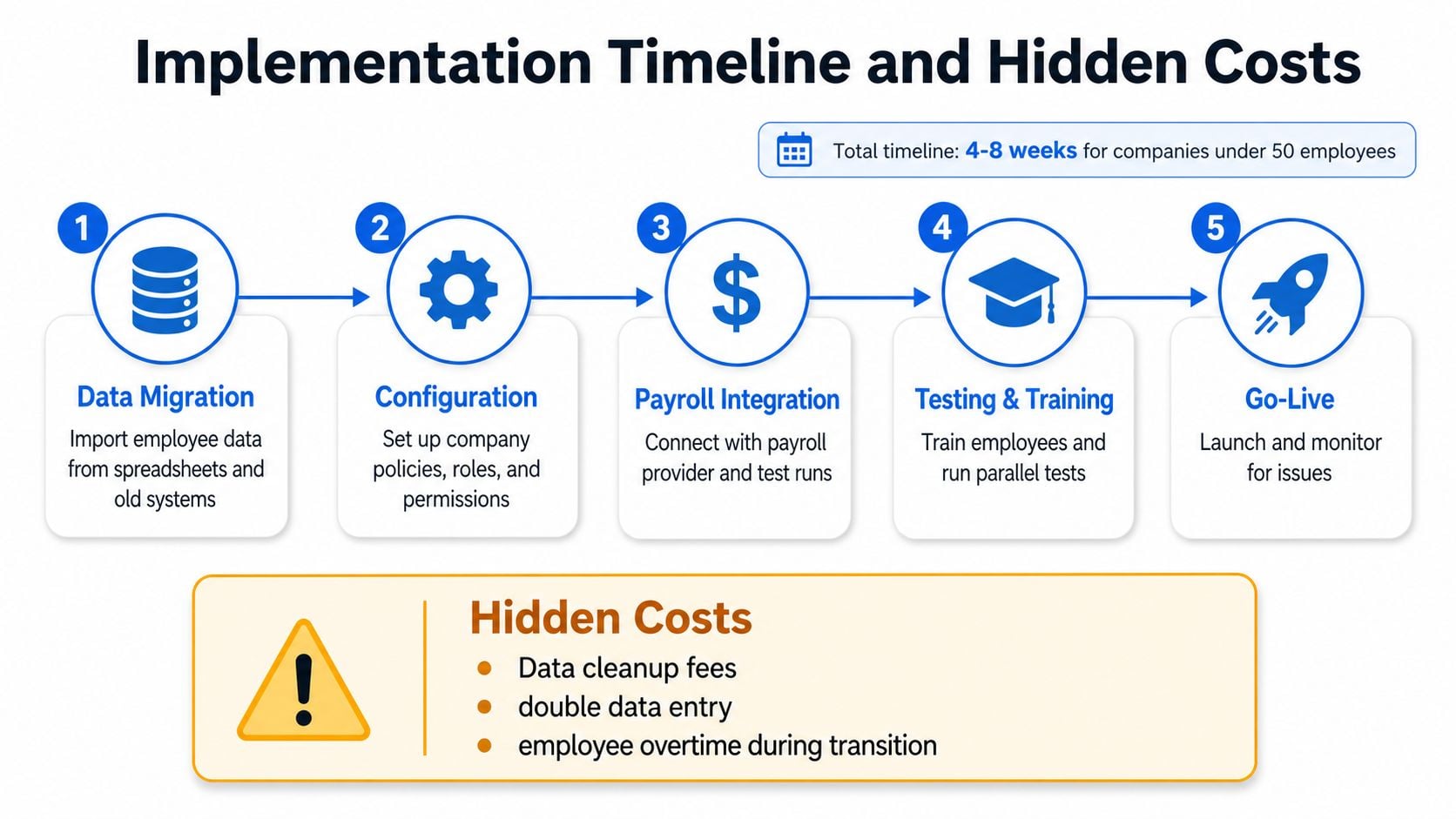
Small-business HRIS implementation is not a weekend task. A practical benchmark for firms under 50 employees is 4 to 8 weeks, split across data migration, configuration, payroll integration, admin training, and employee communication (HRX Connect). That timeline is realistic because someone has to clean the data before anything goes live.
Start with the payroll and tax controls
The U.S. Chamber of Commerce recommends testing the system’s payroll and tax settings before go-live by confirming withholding rates and payroll schedules, then running a compliance or audit report to identify missing documents (U.S. Chamber of Commerce). Those are simple checks, but they catch the failures that become expensive after launch.
Practical rule: if test payroll hasn’t run cleanly, the system isn’t ready.
That checklist matters because the hidden work is usually not the software itself. It’s the cleanup. Employee records need to be standardized, legacy forms need to be found, and approvals need to be mapped so the HR team isn’t rebuilding workflows after go-live. Buyers who skip that prep often end up paying for the same work twice, once in implementation and once in correction.
Use a launch plan that forces discipline
A strong launch sequence keeps the project from drifting. First comes migration, then configuration, then payroll setup, then training, then a controlled go-live with monitoring. The point isn’t speed for its own sake, it’s avoiding surprises in the first live payroll cycle.
For companies also comparing HR service models, PEO Metrics’ HR services provider overview is relevant because implementation effort changes the economics of outsourcing. If a vendor can’t explain who owns data cleanup, test runs, and correction workflows, the buyer should assume those responsibilities will land internally.
How HRIS and PEOs Work Together or Against Each Other
A PEO changes who carries certain employer responsibilities, but it does not remove the need for a clean HRIS. In a PEO arrangement, the PEO becomes the employer of record for tax and compliance purposes, while the HRIS still serves as the system of record for day-to-day people data. If those systems do not exchange clean data, the company ends up with duplicate records, inconsistent approvals, and avoidable reconciliation work.
That split is more than a nuisance. It creates two versions of the truth, and in HR operations that usually means someone has to decide which record wins. For multi-state employers, the stakes rise quickly because tax filing, contractor handling, and benefits administration all depend on accurate data. A better HRIS can lower the compliance load the PEO has to absorb, which gives the buyer more room to negotiate contract terms and service expectations.
The same issue shows up in PEO integration with HRIS platforms. If the handoff between systems is weak, the buyer pays for it later in cleanup, service calls, and manual corrections.
PEOs don’t erase data discipline
A common mistake is assuming the PEO handles everything upstream. It does not. The PEO may process payroll and manage certain compliance duties, but the business still needs reliable people data, clean role assignments, and a clear handoff for new hires, terminations, and status changes. If the HRIS is weak, the PEO spends more time correcting the client’s inputs.
That is why contractor payments, multi-state tax support, and benefits administration matter so much in the HRIS selection process. Those capabilities do more than help HR, they shape how much operational friction the PEO has to carry. A company with better internal systems can negotiate from a stronger position because it can show that it will not need the same level of hand-holding.
For teams that also need to coordinate recruiting tools, ATS platforms ranked by price and features can matter because applicant data often becomes the first point of failure when systems do not align.
Evaluate the combined operating model
The right question is not whether a business should buy HRIS or PEO. The better question is which combination creates the cleanest flow of data, compliance, and approvals. For some companies, a lighter HRIS plus a PEO is the right fit. For others, a stronger HRIS reduces dependence on the PEO for basic recordkeeping and day-to-day administration.
A useful planning mindset is to judge whether the HRIS can handle the next growth layer, not just current headcount. That includes multi-state support, contractor workflows, accounting links, and identity tools. The more those pieces sit cleanly inside the HRIS, the less the company has to pay in PEO complexity later.
Vendor-Agnostic HRIS Selection Checklist
A small business can lose a lot of money by buying the HRIS that looks polished in a demo but forces the team back into spreadsheets a month later. The better filter is operational fit. Score each vendor against the way your company hires, pays, tracks, and reports, then test whether the system will still work once the business adds states, contractors, or a PEO relationship.
Seven criteria worth testing
Start with the checks that affect day-to-day execution:
- Cloud deployment readiness. The platform should fit a distributed, low-admin operating model, not require internal infrastructure support.
- Payroll and tax integration depth. Confirm it can move clean data into payroll without repeated manual fixes or rekeying.
- Multi-state compliance support. This matters as soon as hiring crosses state lines or the business adds contractors in different locations.
- Contractor payment capabilities. The system should handle more than just W-2 employees if the company uses mixed labor.
- Scalability for the next 12 to 24 months. Evaluate what happens when headcount, locations, or entity complexity grow.
- Self-service accessibility. Employees should be able to update their own information without HR intervention for every small change.
- Data portability. If the company switches vendors, the records should be exportable in a usable format.
If a vendor cannot handle those items cleanly, the rest of the feature list matters less than the cost of workarounds.
Score the system before the demo pitch takes over
| HRIS Selection Scorecard | ||
|---|---|---|
| Evaluation Criteria | Weight | Your Rating (1–5) |
| Cloud deployment readiness | High | |
| Payroll and tax integration depth | High | |
| Multi-state compliance support | High | |
| Contractor payment capabilities | Medium | |
| Scalability over the next 12–24 months | High | |
| Self-service accessibility | Medium | |
| Data portability | High |
Use the scorecard to compare systems on the same terms, then test the results against your operating model. A platform that feels simple at 25 employees can become expensive once compliance gets harder, especially if the company is growing into new states or working with a PEO. A slightly more capable system may cost more up front, yet still be cheaper if it reduces admin time, PEO correction work, and payroll errors.
For teams that also need an applicant tracking system, ATS platforms ranked by price and features is a useful reference because recruiting data often becomes the first place where systems fall out of sync. For context on outsourced HR support and how it differs from software ownership, the HR services provider page is a practical comparison point.
Your 30-Day Action Plan for Choosing and Implementing HRIS
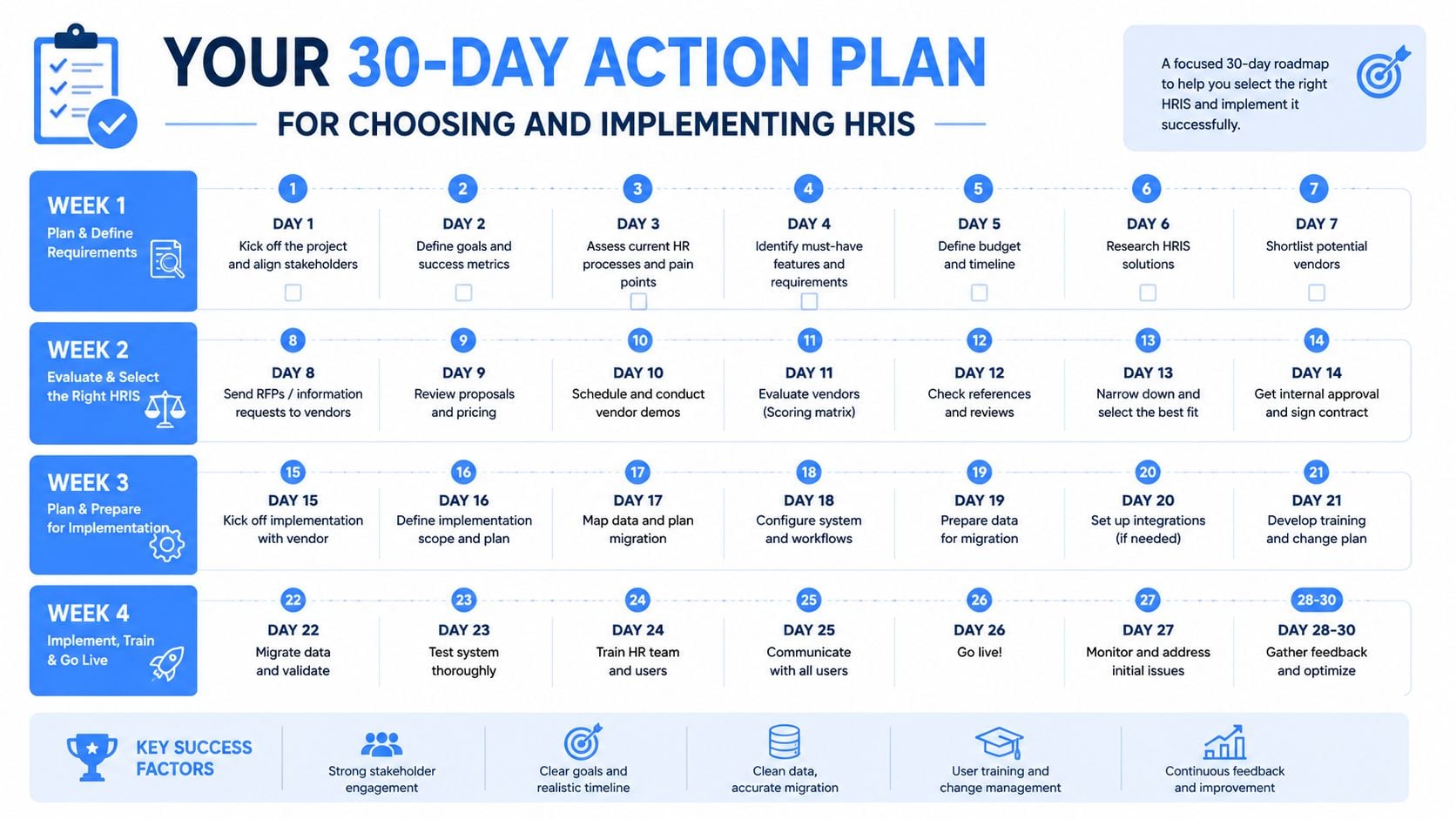
The first 30 days should be about narrowing risk, not chasing feature demos. Days 1 through 7 should document current HR pain points, payroll bottlenecks, compliance gaps, and every place employee data gets rekeyed. Days 8 through 14 should focus on vendor research and demos, with the shortlist limited to systems that match the company’s real operating model.
Days 15 through 21 should be used for scorecard evaluation, cost modeling, and a hard look at implementation effort. Days 22 through 28 should cover contract review, data portability questions, and any compliance concerns that need legal or payroll review. Days 29 and 30 should lock in the implementation plan, including migration tasks, training, and the live payroll test.
The best HRIS decision is the one that makes payroll cleaner, compliance easier, and the PEO conversation more disciplined.
That’s the key takeaway. HRIS isn’t just admin software, it’s part of the company’s operating infrastructure, and the wrong choice can cost more than the subscription line suggests. A careful buyer should compare systems the same way they would compare a PEO, with independent analysis, contract scrutiny, and a total-cost view.
If the HRIS decision is tangled up with a PEO renewal, a payroll overhaul, or a move into new states, PEO Metrics can help compare the options side by side and pressure-test the trade-offs before a contract gets signed. Visit PEO Metrics to get independent guidance on selection, pricing, and negotiation so the next move is based on facts, not vendor pressure.
